Azure Landing Zone: Brownfield Transition Guide
In this article
Many organizations land in the same place: they started in Azure fast, got workloads running, and now have a sprawl of subscriptions, ad-hoc resource groups, inconsistent policies, and no clear governance structure. The good news is that Microsoft has a well-defined path to align brownfield environments with the Azure Landing Zone (ALZ) reference architecture, and it can be done incrementally without tearing everything down.
What Is a Brownfield Environment?
A brownfield Azure environment is any existing deployment that was not built to the Azure Landing Zone reference architecture from the start. Common characteristics:
- One or a few subscriptions doing everything (platform + workloads mixed together)
- No management group hierarchy, or a flat/shallow one
- Policies applied ad-hoc at the subscription or resource group level
- RBAC assignments scattered at multiple scopes
- No centralized hub network or inconsistent connectivity design
- No separation of platform (identity, connectivity, management) from application workloads
This is not a failure; it is the normal evolution of most Azure tenants. The goal of alignment is not to start over, but to progressively improve governance, security, and operational consistency.
Reference: Transition an existing Azure environment to the Azure landing zone reference architecture
Understanding the Target: ALZ Reference Architecture
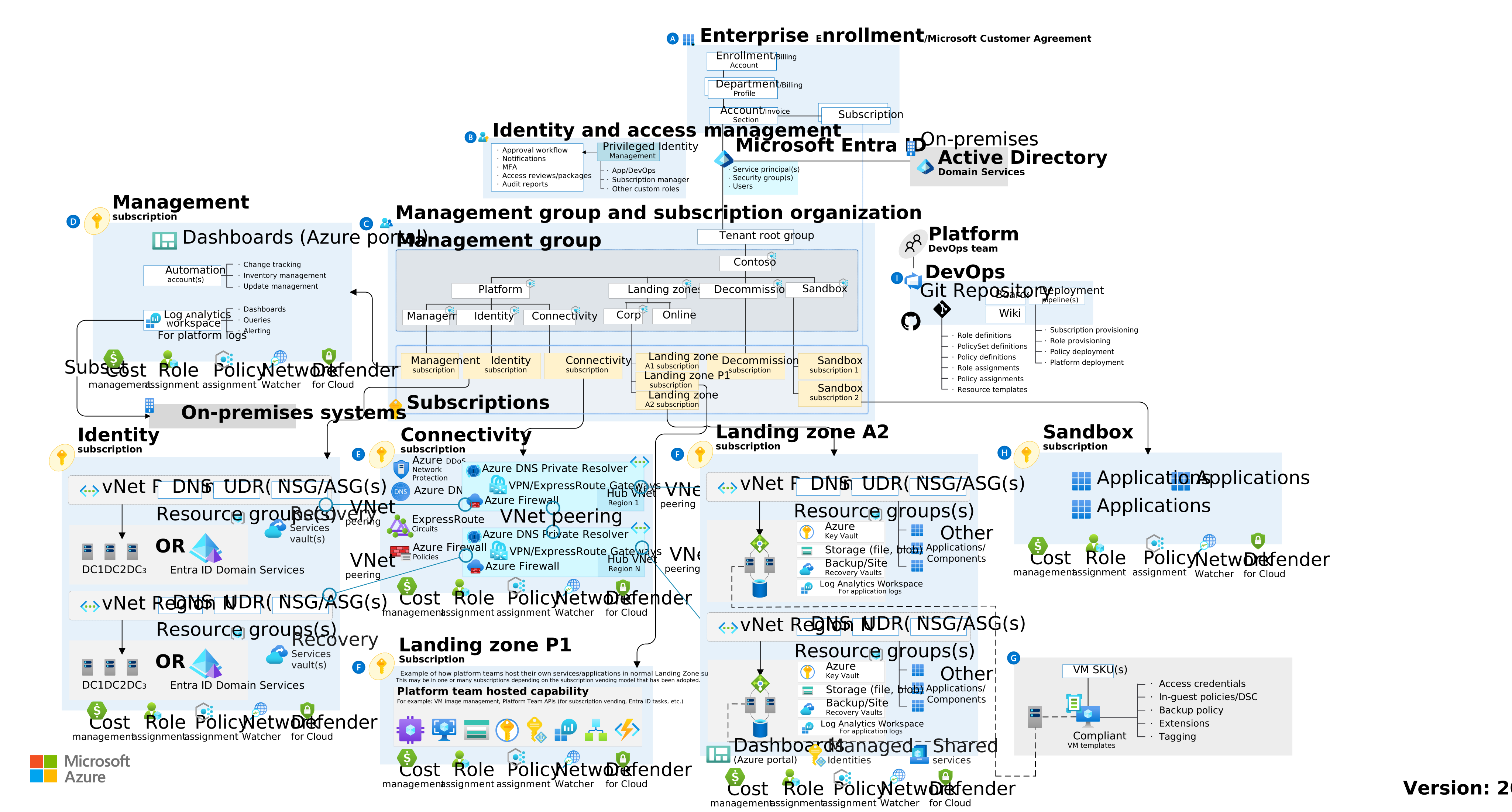
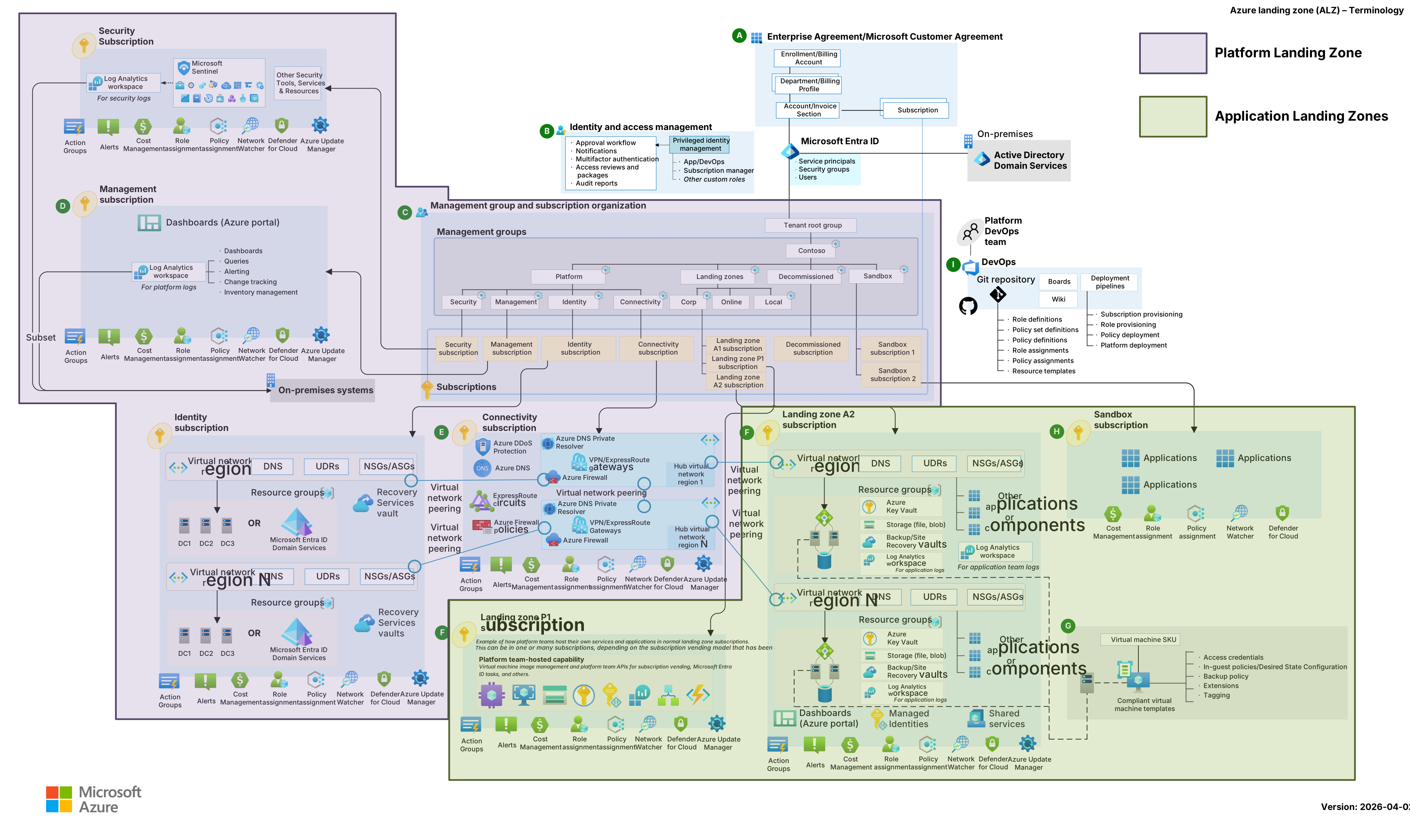
Before transitioning, it helps to understand what you are moving toward. The Azure Landing Zone reference architecture defines eight design areas:
| Letter | Design Area | Purpose |
|---|---|---|
| A | Billing and Entra ID tenant | Tenant creation, enrollment, billing structure |
| B | Identity and access management | Security boundary, RBAC, Entra ID integration |
| C | Resource organization | Management group hierarchy, subscription design |
| D | Governance | Policy-driven guardrails, Azure Policy at scale |
| E | Network topology and connectivity | Hub-spoke, hybrid connectivity, DNS |
| F | Security | Defender for Cloud, secure baselines |
| G/H | Management | Monitoring baseline, platform operations |
| I | Platform automation and DevOps | IaC, deployment pipelines |
The canonical management group structure looks like this:
Tenant Root Group
  └── [Your Org]
        ├── Platform
        │     ├── Identity
        │     ├── Connectivity
        │     └── Management
        ├── Landing Zones
        │     ├── Corp       (VNet-connected workloads)
        │     └── Online     (internet-facing workloads)
        ├── Sandbox
        └── Decommissioned
Workload subscriptions live under Corp or Online depending on whether they require private network connectivity to on-premises or other Azure resources.
Reference: Azure landing zone design areas
The Golden Rule: Build in Parallel, Migrate Incrementally
The most important principle when transitioning a brownfield environment is:
Never modify production in place. Deploy the new structure in parallel and migrate workloads progressively.
This approach guarantees:
- Active workloads are not disrupted during the transition
- Teams can assess policy compliance before enforcement takes effect
- Rollback is possible at any point — the old structure still works
- Migration can be paced by team capacity and risk tolerance
Phase 1: Assess Your Current State
Before moving anything, document what you have.
Step 1.1: Inventory Resources
Use Azure Resource Graph to get a complete picture:
Resources
| summarize count() by type, subscriptionId
| order by count_ desc
Key questions to answer:
- How many subscriptions exist, and what is in each?
- Are platform resources (gateways, firewalls, DNS, monitoring) mixed with workload resources?
- What management groups (if any) exist today?
- What policies are assigned, at what scopes, and with what effects?
- What RBAC role assignments exist and at which scopes?
Step 1.2: Identify What Cannot Move
Some resource types do not support Azure Resource Manager move operations. Before planning any resource migrations, cross-reference your inventory against the supported resources list.
Common resources that require care when moving:
- Virtual Networks (peering must be removed first, then re-established after)
- VPN Gateways and ExpressRoute Gateways
- Recovery Services Vaults (backups and replication configurations)
- Key Vault (access policies and firewall rules need review post-move)
- Managed Identities (role assignments tied to ResourceId update on move)
Step 1.3: Understand Your Policy Landscape
Audit what policies are currently assigned at each scope using Azure Policy compliance reports or Resource Graph:
PolicyResources
| where type == "microsoft.authorization/policyassignments"
| project name, properties.scope, properties.policyDefinitionId, properties.enforcementMode
This will be critical input for the transition; you need to know what guardrails already exist before adding new ones.
Phase 2: Deploy the Target Structure (Parallel, Not Replacing)
Step 2.1: Deploy the ALZ Management Group Hierarchy
Deploy the ALZ management group structure into your existing tenant without moving any subscriptions yet. This creates the target hierarchy alongside your current structure, with zero impact to running workloads.
Options to deploy:
- Azure Landing Zone Bicep: github.com/Azure/ALZ-Bicep
- Azure Landing Zone Terraform: github.com/Azure/terraform-azurerm-caf-enterprise-scale
- Azure Portal (accelerator): Available via the Azure portal landing zone deployment experience
The deployment creates:
- The management group hierarchy
- ALZ built-in policy assignments and initiatives
- Role definitions
- Diagnostic settings baseline
Note: This deployment creates management groups and policies only. No subscriptions are moved, and no existing workloads are affected.
Step 2.2: Configure Policies in Audit-Only Mode (Recommended Approach)
When you first deploy ALZ policies to the new management group hierarchy, set all policy assignments to DoNotEnforce (audit-only) mode. This is the Microsoft-recommended brownfield approach.
Setting enforcementMode: DoNotEnforce on a policy assignment means:
- Resources that violate the policy will appear as non-compliant in the portal
- No deployments are blocked — Deny effects become no-ops
DeployIfNotExistsandModifyeffects do not auto-remediate existing resources- Application teams can evaluate compliance findings without risk of disruption
{
  "properties": {
    "policyDefinitionId": "/providers/Microsoft.Authorization/policySetDefinitions/...",
    "enforcementMode": "DoNotEnforce"
  }
}
This creates a "shadow compliance" view: you can see exactly what would be non-compliant under ALZ standards before any enforcement takes effect.
Step 2.3: Deploy Platform Subscriptions
Create new, clean subscriptions for platform functions:
| Subscription | Purpose |
|---|---|
| Connectivity | Hub VNet, VPN/ExpressRoute gateways, Azure Firewall, DNS |
| Identity | Domain controllers, Entra ID Connect, AD DS |
| Management | Log Analytics workspace, Automation Account, Defender for Cloud |
Place each under the appropriate Platform management group. These subscriptions start fresh with no legacy resources and are built to ALZ standards from day one.
Phase 3: Remediate and Migrate Workloads
Step 3.1: Assess Policy Compliance in Audit Mode
With policies assigned in DoNotEnforce mode, review the compliance dashboard for each workload subscription. Work with application teams to understand and address findings before moving subscriptions into the enforced hierarchy.
Common findings in brownfield environments:
- Missing diagnostic settings on resources
- Public network access enabled on storage accounts or databases
- No resource locks on critical infrastructure
- Missing required tags
- NSGs with overly permissive rules
- Resources deployed without private endpoints
Step 3.2: Moving Subscriptions into the Target Hierarchy
When a subscription is compliance-ready, move it to the appropriate management group.
RBAC requirements to move a subscription:
- Owner on the subscription (direct assignment), AND
- Write permission on the target management group (Owner, Contributor, or Management Group Contributor)
What happens when you move a subscription:
- ResourceIds do not change — no impact on existing monitoring, alerts, or connections
- The subscription immediately inherits policies and RBAC from the new management group scope
- Existing resources in the subscription become subject to new policy assignments in audit mode immediately, but are not blocked
- New resource writes in the subscription are subject to Deny policies in real time after enforcement is enabled
Note: Inherited RBAC from the new management group can take up to 30 minutes to propagate. Users may need to sign out and back in to refresh their tokens.
Step 3.3: Moving Resources Between Subscriptions
If a subscription is too messy to clean up in place, or if you need to redistribute resources across new purpose-built subscriptions, you can move individual resources or resource groups.
Before moving resources:
- Verify the resource type is supported for moves
- For VNets: remove all peering connections first
- For Recovery Services Vaults: stop replication/backup, move, then reconfigure
- Assess current RBAC assignments — ResourceIds change on resource moves
- Assess monitoring alerts and dashboards — ResourceIds change on resource moves
- Check if any policies at destination will immediately block or remediate the resources
During a resource move:
- The source and destination resource groups are locked — no add/update/delete operations can occur during the move window
- Plan this window with stakeholders; it is not zero-downtime for control-plane operations (data-plane is typically unaffected)
After moving resources:
- Validate new RBAC and policy compliance
- Update any monitoring alerts, dashboards, or automation that referenced old ResourceIds
- Re-establish VNet peering if applicable
- Validate backup and disaster recovery configurations
Phase 4: Enable Policy Enforcement Incrementally
Once application teams have addressed compliance findings for their workloads:
Step 4.1: Enable Enforcement Per Subscription
Rather than enabling enforcement globally at once, move subscriptions from the audit-only duplicate management group to the production management group where enforcement is active. This gives each team a clear milestone: when their compliance report is clean, they graduate to enforced.
[Brownfield-Corp]     ← DoNotEnforce policies (audit only)
[Corp]                ← Enforced policies (production standard)
The team remediates findings in Brownfield-Corp, then the subscription moves to Corp.
Step 4.2: Handle Non-Compliant Existing Resources
For resources that were deployed before a policy was assigned, you must manually remediate them. Non-compliant resources are not automatically fixed by DeployIfNotExists policies, you must trigger a remediation task:
- Go to Azure Policy > Compliance
- Find the non-compliant policy assignment
- Click "Create Remediation Task"
- Select scope and re-evaluate
For Deny findings: the resource already exists and won't be deleted, but future modifications to it may be blocked. Update the resource to comply (e.g., disable public network access) before enforcement is active.
Step 4.3: Decommission the Old Structure
Once all workloads are moved and compliance is confirmed:
- Move any remaining subscriptions to the Decommissioned management group
- Verify no active workloads remain in those subscriptions
- Cancel or reassign subscriptions that are no longer needed
- Remove legacy management groups and policy assignments that no longer apply
Phase 5: Rebuild Platform Services in the New Hub
For organizations with existing hybrid connectivity (VPN Gateway, ExpressRoute), the existing infrastructure may need to be migrated to the new Connectivity subscription. This is the most disruptive phase and requires careful coordination.
Hub Network Migration
Option A: Parallel Hub (Recommended)
- Deploy a new hub VNet in the Connectivity subscription
- Set up new VPN/ExpressRoute Gateway in the new hub
- Configure routing and firewall policy in the new hub
- Peer spoke VNets to both old and new hubs temporarily
- Migrate traffic routing to the new hub progressively (by spoke or workload)
- Validate routing and connectivity at each step
- Remove peering to the old hub after all traffic is confirmed on the new hub
- Decommission the old hub resources
Option B: In-Place Move (Higher Risk)
Move existing gateway and network resources to the new Connectivity subscription. This requires:
- Removing VNet peering before moving
- Accepting a connectivity outage window during the VNet/gateway move
- Re-establishing all peering post-move
- Updating UDRs and NSG rules that reference old ResourceIds
Option A is recommended for production environments. Option B may be acceptable for smaller environments with a defined maintenance window.
DNS Migration
If your organization uses custom DNS (Azure Private DNS Zones or VM-based DNS):
- Deploy the target DNS architecture in the Connectivity subscription first
- Add records to the new DNS resolvers before switching
- Update DHCP/DNS settings on spoke VNets to point to new resolvers
- Validate name resolution from representative workloads
- Decommission old DNS resources after validation
Monitoring and Management
Migrate your Log Analytics workspace to the Management subscription:
- Create a new workspace in the Management subscription
- Update diagnostic settings on all resources to send to the new workspace
- Migrate saved queries, workbooks, and alert rules
- Keep the old workspace in read-only mode for historical log access during the transition period (Log Analytics retains data per its retention setting)
- Decommission the old workspace after the retention period or once historical access is no longer needed
Common Pitfalls to Avoid
Enforcing policies before remediating existing resources
Always use DoNotEnforce mode first. Enabling Deny effects on a running environment before teams have remediated will block deployments and cause incidents.
Moving VNets without removing peering first VNet moves will fail if peering is active. Removing peering may briefly disrupt connectivity for workloads that depend on it. Plan this as a maintenance window.
Forgetting ResourceId changes break monitoring Every time a resource is moved to a new resource group or subscription, its ResourceId changes. Alerts, dashboards, runbooks, and ARM-based automation that reference the old ResourceId will stop working.
Not assessing RBAC before moving subscriptions Management group moves do not change existing direct RBAC on subscriptions, but they add inherited permissions from the new parent. Audit who would gain access before moving.
Moving Recovery Services Vaults Vaults with active backup or replication workloads cannot be moved in most cases. The safest path is to create a new vault in the target subscription, reconfigure backups, and let the old vault's data age out per its retention policy.
Summary: The Transition Sequence
Phase 1: Assess current state
  └── Inventory resources, policies, RBAC
  └── Identify what can and cannot move

Phase 2: Build target in parallel
  └── Deploy ALZ management group hierarchy
  └── Assign policies in DoNotEnforce (audit) mode
  └── Create new Platform subscriptions (Connectivity, Identity, Management)

Phase 3: Migrate workloads
  └── Assess audit compliance findings with app teams
  └── Move subscriptions into new hierarchy (policies still in audit)
  └── Move resources across subscriptions where needed

Phase 4: Enable enforcement
  └── Remediate non-compliant resources
  └── Move subscriptions from audit MG to enforced MG as they become compliant
  └── Decommission old management groups and subscriptions

Phase 5: Rebuild platform
  └── Migrate hub network (parallel approach recommended)
  └── Migrate DNS
  └── Migrate monitoring workspace
  └── Decommission old platform resources
Further Reading
- Transition existing Azure environments to ALZ
- Brownfield with duplicate audit-only MG (recommended approach)
- Single subscription transition scenario
- ALZ design areas
- Policy enforcement mode (DoNotEnforce)
- Move resources to a new resource group or subscription
- Resource types supported for move
- ALZ Bicep on GitHub
- Readying your landing zone for migration