AVM Deep Dive: Getting Started with Subscription Vending in Azure
In this article
This is the first post in a deep dive series on Azure Verified Modules. We're starting with subscription vending because it's where platform engineering work in Azure usually begins — before workloads, before networking, before any resource gets deployed. If you're building a landing zone practice, subscription vending is the foundation.
This post covers where to start, what the Microsoft-recommended model looks like, how to connect the AVM Terraform module into a GitHub Actions pipeline with OIDC authentication, and what decisions you'll need to make before writing any code.
What Is Subscription Vending?
Subscription vending is a platform mechanism for programmatically issuing Azure subscriptions to application teams that need to deploy workloads. Rather than application teams manually creating subscriptions, navigating enrollment accounts, and configuring governance themselves, the platform team exposes a governed, automated front door.
The result: app teams get a subscription that's already placed in the right management group, has the right policies assigned, has initial networking configured, has a budget alert set up, and has the right RBAC in place — in hours instead of days or weeks.
Microsoft's Cloud Adoption Framework defines subscription vending as a progression of subscription democratization: the principle that subscriptions (not resource groups) are the primary unit of workload management and scale.

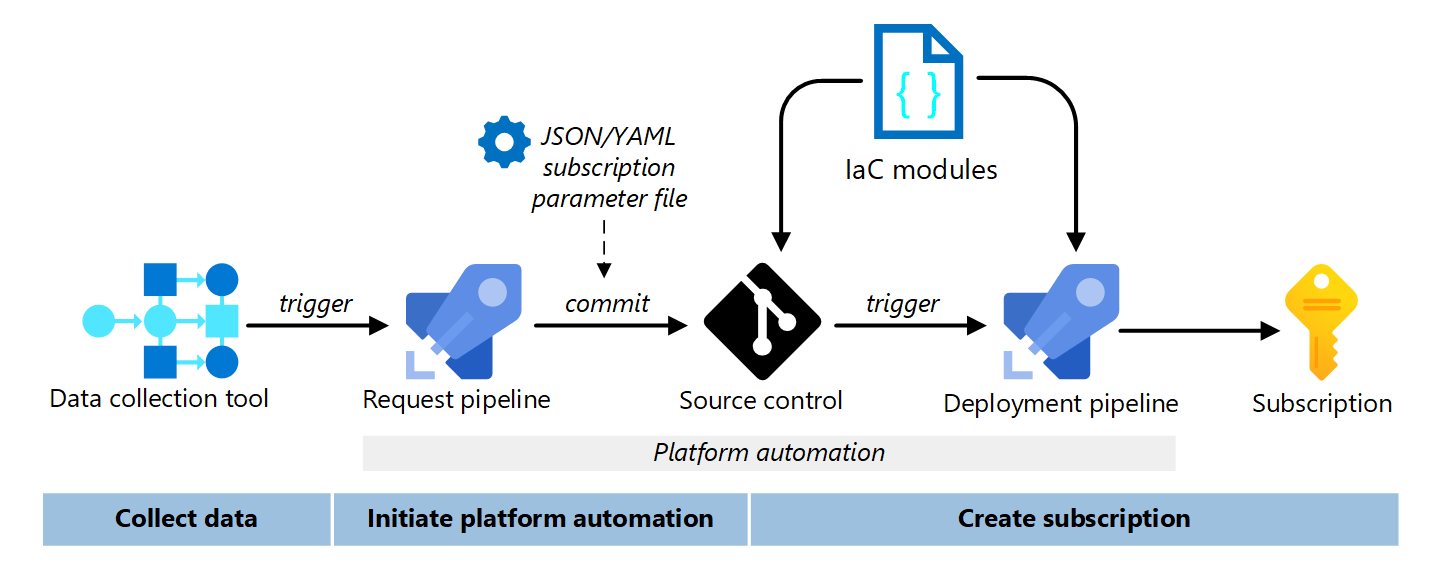
The Three Teams
The CAF model for subscription vending involves three distinct teams:
| Team | Responsibilities |
|---|---|
| Cloud Center of Excellence (CCoE) | Establishes business logic, approval gates, and data collection process |
| Platform Team | Owns and maintains the IaC automation, pipeline, and governance enforcement |
| Application Team | Submits subscription requests; receives and operates the subscription after handoff |
The platform team builds and maintains the automation. The CCoE defines what data to collect and what the approval process looks like. The app team is the consumer — they fill out a form (or submit a YAML/TFVARS file) and receive a ready-to-use subscription.

What a Subscription Vending Automation Does
A well-designed subscription vending pipeline handles the following in a single automated run:
Subscription creation
- Creates the subscription via the billing API (requires EA, MCA, or MPA commercial agreement)
- Places it in the correct management group based on workload classification
Governance
- Assigns subscription-level Azure RBAC (owner, contributor, reader groups)
- Inherits Azure Policy assignments from the management group hierarchy
- Enrolls in Microsoft Defender for Cloud
Networking
- Deploys a spoke virtual network with the correct address space (from IPAM if integrated)
- Peerings to the regional hub network
Cost management
- Creates a subscription-level budget with alert notifications
- Applies required tags for cost allocation (CostCenter, Owner, Environment, Application)
Identity
- Creates or assigns the subscription owner
- Provisions a user-assigned managed identity for workload deployments
- Optionally configures federated credentials for GitHub Actions or other CI/CD
Handoff
- Notifies the application team the subscription is ready
- Updates the ITSM ticket with the subscription ID and resource IDs
The AVM Terraform Module: avm-ptn-alz-sub-vending
Microsoft publishes an AVM Pattern module specifically for subscription vending:
Azure/avm-ptn-alz-sub-vending/azure
Published at: registry.terraform.io/modules/Azure/avm-ptn-alz-sub-vending/azure
This module uses the AzAPI provider to create the subscription and deploy all resources in a single terraform apply. It's designed to be instantiated once per subscription — each landing zone gets its own module block and its own Terraform state file.
Important: For Terraform implementations, use a dedicated state file for each application landing zone subscription. This improves
plan/applyperformance and limits the blast radius of potential misconfigurations.
Module Requirements
| Requirement | Version |
|---|---|
| Terraform | ~> 1.10 |
| azapi provider | ~> 2.5 |
| modtm provider | ~> 0.3 |
| random provider | ~> 3.5 |
What the Module Handles
The module is organized into logical capability areas:
- Subscription creation and management group placement — creates the subscription alias and places it in the specified management group
- Networking — deploy VNets with hub-spoke peering, vWAN connectivity, mesh peering, or dynamic IPAM address allocation
- Role assignments — assign RBAC at subscription scope or resource group scope
- Resource provider registration — registers a comprehensive set of resource providers by default (matching the azurerm provider's defaults)
- Resource group creation — creates initial resource groups including the managed
NetworkWatcherRG - User-assigned managed identity creation — creates UMIs with optional federated credential configuration for GitHub Actions, Terraform Cloud, or other OIDC providers
- Budgets — creates subscription-level budgets with configurable thresholds and notifications
Minimal Example
module "lz_vending" {
  source  = "Azure/avm-ptn-alz-sub-vending/azure"
  version = "0.2.1"

  location = "eastus"

  # Subscription
  subscription_alias_enabled = true
  subscription_billing_scope = "/providers/Microsoft.Billing/billingAccounts/1234567/enrollmentAccounts/123456"
  subscription_display_name  = "sub-corp-workload-001"
  subscription_alias_name    = "sub-corp-workload-001"
  subscription_workload      = "Production"

  # Management group placement
  subscription_management_group_association_enabled = true
  subscription_management_group_id                  = "Corp"

  # Tags
  subscription_tags = {
    CostCenter   = "CC-12345"
    Owner        = "platform@contoso.com"
    Environment  = "Production"
    Application  = "workload-name"
  }
}
Adding Networking
  virtual_network_enabled = true
  virtual_networks = {
    spoke = {
      name                    = "vnet-workload-eastus"
      address_space           = ["10.100.0.0/24"]
      resource_group_key      = "networking"
      hub_peering_enabled     = true
      hub_network_resource_id = "/subscriptions/00000000-0000-0000-0000-000000000000/resourceGroups/rg-hub/providers/Microsoft.Network/virtualNetworks/vnet-hub-eastus"
    }
  }
Adding a Budget
  budget_enabled = true
  budgets = {
    monthly = {
      name              = "budget-monthly"
      amount            = 1000
      time_grain        = "Monthly"
      time_period_start = "2026-06-01T00:00:00Z"
      time_period_end   = "2030-12-31T23:59:59Z"
      notifications = {
        eighty_percent = {
          enabled        = true
          operator       = "GreaterThan"
          threshold      = 80
          threshold_type = "Actual"
          contact_emails = ["platform@contoso.com"]
        }
        forecast_exceeded = {
          enabled        = true
          operator       = "GreaterThan"
          threshold      = 110
          threshold_type = "Forecasted"
          contact_roles  = ["Owner"]
        }
      }
    }
  }
Adding Role Assignments
  role_assignment_enabled = true
  role_assignments = {
    contributors = {
      principal_id   = "00000000-0000-0000-0000-000000000000" # Entra group object ID
      definition     = "Contributor"
      relative_scope = ""
    }
    readers = {
      principal_id   = "11111111-1111-1111-1111-111111111111"
      definition     = "Reader"
      relative_scope = ""
    }
  }
Billing Scope by Agreement Type
Before you can run terraform apply, you need the correct billing scope. The format differs by agreement type:
| Agreement | Billing scope format |
|---|---|
| EA (Enterprise Agreement) | /providers/Microsoft.Billing/billingAccounts/{billingAccountName}/enrollmentAccounts/{enrollmentAccountName} |
| MCA (Microsoft Customer Agreement) | /providers/Microsoft.Billing/billingAccounts/{billingAccountName}/billingProfiles/{billingProfileName}/invoiceSections/{invoiceSectionName} |
| MPA (Microsoft Partner Agreement) | /providers/Microsoft.Billing/billingAccounts/{billingAccountName}/customers/{customerName} |
If you don't have a commercial agreement, you cannot create subscriptions programmatically. You can still automate all subscription configuration (networking, RBAC, policies, budgets) — you just need to introduce a manual step to create the subscription first, then pass the
subscription_idvariable to the module withsubscription_alias_enabled = false.
Authenticating Terraform to Azure with OIDC
This is where most teams make their first architectural decision: how does the pipeline authenticate to Azure? The answer matters because subscription vending requires tenant-level permissions — you need to create subscriptions, assign management group placement, and configure billing. That's a highly privileged identity.
Why OIDC Instead of a Client Secret
The old pattern was to create a service principal, generate a client secret, stuff it in GitHub Secrets, and pass it as ARM_CLIENT_SECRET. That works, but it has problems:
- Secrets expire and need rotation — if you miss a rotation, pipelines break
- Secrets can be exfiltrated from secrets stores
- You're managing a credential that doesn't need to exist
OIDC (OpenID Connect) / Workload Identity Federation eliminates the secret entirely. GitHub Actions generates a short-lived token for each workflow run. Azure is configured to trust tokens from your specific GitHub repository and workflow. No secret is stored anywhere.
This is the current recommended approach per both Microsoft's docs and HashiCorp's Terraform backend docs.
Step 1: Create the Entra Application and Service Principal
# Create the app registration
az ad app create --display-name "sp-terraform-sub-vending"

# Note the appId from the output
APP_ID="<appId from output>"

# Create the service principal
az ad sp create --id $APP_ID
SP_OBJECT_ID=$(az ad sp show --id $APP_ID --query id -o tsv)
Step 2: Assign Required Permissions
For subscription vending, the service principal needs permissions at multiple scopes:
TENANT_ID=$(az account show --query tenantId -o tsv)
BILLING_ACCOUNT="<your billing account name>"
ENROLLMENT_ACCOUNT="<your enrollment account name>"

# Subscription Creator on the enrollment account (for EA)
az role assignment create \
  --role "Enrollment Account Subscription Creator" \
  --assignee $SP_OBJECT_ID \
  --scope "/providers/Microsoft.Billing/billingAccounts/${BILLING_ACCOUNT}/enrollmentAccounts/${ENROLLMENT_ACCOUNT}"

# Management Group Contributor at root (for MG placement)
az role assignment create \
  --role "Management Group Contributor" \
  --assignee $SP_OBJECT_ID \
  --scope "/providers/Microsoft.Management/managementGroups/${TENANT_ID}"

# Owner at the target management group (for RBAC assignment delegation)
az role assignment create \
  --role "Owner" \
  --assignee $SP_OBJECT_ID \
  --scope "/providers/Microsoft.Management/managementGroups/Corp"
Principle of least privilege: Scope the Owner assignment to the specific management groups that will receive vended subscriptions, not at the root. Review what permissions are actually needed for your use case — subscription creation, MG placement, and RBAC delegation each have separate roles.
Step 3: Configure Federated Identity Credentials
Configure Azure to trust tokens issued by GitHub Actions for your specific repository:
GITHUB_ORG="your-org"
GITHUB_REPO="your-repo"

# Trust the main branch
az ad app federated-credential create \
  --id $APP_ID \
  --parameters '{
    "name": "github-main",
    "issuer": "https://token.actions.githubusercontent.com",
    "subject": "repo:'"${GITHUB_ORG}/${GITHUB_REPO}"':ref:refs/heads/main",
    "description": "GitHub Actions main branch",
    "audiences": ["api://AzureADTokenExchange"]
  }'

# Trust pull requests (for plan-only workflows)
az ad app federated-credential create \
  --id $APP_ID \
  --parameters '{
    "name": "github-pull-request",
    "issuer": "https://token.actions.githubusercontent.com",
    "subject": "repo:'"${GITHUB_ORG}/${GITHUB_REPO}"':pull_request",
    "description": "GitHub Actions pull requests",
    "audiences": ["api://AzureADTokenExchange"]
  }'
Step 4: Add GitHub Secrets
In your GitHub repository → Settings → Secrets and variables → Actions, create three secrets.


| Secret name | Value |
|---|---|
AZURE_CLIENT_ID |
The App ID (client ID) of your app registration |
AZURE_TENANT_ID |
Your Azure tenant ID |
AZURE_SUBSCRIPTION_ID |
The subscription ID where the Terraform state storage account lives |
Use repository secrets for internal repos. For public repos, use environment secrets with a required reviewer approval gate.
Remote State: Storing Terraform State in Azure
Terraform state needs to live somewhere outside the pipeline runner. For Azure, that means Azure Blob Storage. The recommended authentication method for the backend is also OIDC — the same identity that runs the pipeline reads and writes state.
Create the Storage Infrastructure
RESOURCE_GROUP="rg-terraform-state"
STORAGE_ACCOUNT="stterraformstate$(openssl rand -hex 4)"
CONTAINER="tfstate"
LOCATION="eastus"

az group create --name $RESOURCE_GROUP --location $LOCATION

az storage account create \
  --name $STORAGE_ACCOUNT \
  --resource-group $RESOURCE_GROUP \
  --location $LOCATION \
  --sku Standard_LRS \
  --min-tls-version TLS1_2 \
  --allow-blob-public-access false \
  --https-only true

az storage container create \
  --name $CONTAINER \
  --account-name $STORAGE_ACCOUNT

# Grant the service principal Storage Blob Data Contributor on the container
az role assignment create \
  --role "Storage Blob Data Contributor" \
  --assignee $SP_OBJECT_ID \
  --scope "/subscriptions/<sub-id>/resourceGroups/${RESOURCE_GROUP}/providers/Microsoft.Storage/storageAccounts/${STORAGE_ACCOUNT}/blobServices/default/containers/${CONTAINER}"
Enable versioning on the storage account for state file recovery. Consider a resource lock on the resource group to prevent accidental deletion.
Backend Configuration
terraform {
  required_version = "~> 1.10"

  backend "azurerm" {
    use_oidc             = true
    use_azuread_auth     = true
    tenant_id            = "00000000-0000-0000-0000-000000000000"
    client_id            = "00000000-0000-0000-0000-000000000000"
    storage_account_name = "stterraformstate1234"
    container_name       = "tfstate"
    key                  = "sub-vending/prod.terraform.tfstate"
  }
}
Pass sensitive values via environment variables (
ARM_TENANT_ID,ARM_CLIENT_ID) or-backend-configflags in CI rather than hardcoding them in the configuration file. Hardcoded values end up in plan files.
The GitHub Actions Workflow
Here's a complete workflow that runs terraform plan on pull requests and terraform apply on merge to main:
name: Subscription Vending

on:
  push:
    branches: [main]
    paths:
      - 'subscriptions/**'
  pull_request:
    branches: [main]
    paths:
      - 'subscriptions/**'

permissions:
  id-token: write   # Required for OIDC token
  contents: read
  pull-requests: write

env:
  ARM_USE_OIDC: "true"
  ARM_USE_AZUREAD: "true"
  ARM_CLIENT_ID: $
  ARM_TENANT_ID: $
  ARM_SUBSCRIPTION_ID: $
  TF_VERSION: "1.10.5"

jobs:
  plan:
    name: Terraform Plan
    runs-on: ubuntu-latest
    if: github.event_name == 'pull_request'
    defaults:
      run:
        working-directory: subscriptions/

    steps:
      - uses: actions/checkout@v4

      - name: Setup Terraform
        uses: hashicorp/setup-terraform@v3
        with:
          terraform_version: $

      - name: Terraform Init
        run: terraform init

      - name: Terraform Format Check
        run: terraform fmt -check -recursive

      - name: Terraform Validate
        run: terraform validate

      - name: Terraform Plan
        run: terraform plan -out=tfplan

      - name: Comment Plan on PR
        uses: actions/github-script@v7
        with:
          script: |
            const output = `#### Terraform Plan 📖
            Plan completed successfully. Review the output in the workflow run.`;
            github.rest.issues.createComment({
              issue_number: context.issue.number,
              owner: context.repo.owner,
              repo: context.repo.repo,
              body: output
            });

  apply:
    name: Terraform Apply
    runs-on: ubuntu-latest
    if: github.event_name == 'push' && github.ref == 'refs/heads/main'
    environment: production  # Requires approval gate
    defaults:
      run:
        working-directory: subscriptions/

    steps:
      - uses: actions/checkout@v4

      - name: Setup Terraform
        uses: hashicorp/setup-terraform@v3
        with:
          terraform_version: $

      - name: Terraform Init
        run: terraform init

      - name: Terraform Apply
        run: terraform apply -auto-approve
Key Points About This Workflow
permissions: id-token: writeis required at the job or workflow level for OIDC to work. Without it, GitHub won't issue the token.environment: productionon the apply job creates a deployment environment with an optional required-reviewer approval gate — the human review step before real subscriptions get created.- The workflow is scoped to
paths: subscriptions/**so it only triggers when subscription parameter files change, not on unrelated commits. ARM_*environment variables are set at the workflow level and automatically picked up by both the Terraform provider and the azurerm backend.
Recommended Repository Structure
platform-repo/
├── subscriptions/
│   ├── main.tf              # Module calls, one per subscription
│   ├── variables.tf
│   ├── versions.tf          # Provider + backend config
│   ├── outputs.tf
│   └── tfvars/
│       ├── sub-corp-001.tfvars
│       └── sub-sandbox-001.tfvars
├── modules/                 # Local wrappers if needed
└── .github/
    └── workflows/
        └── subscription-vending.yml
One key decision: how do you structure module instantiation? Two common patterns:
Pattern A — One main.tf with multiple module blocks:
Simple to start. Each new subscription is a new module block. Works fine at small scale but plan time grows linearly.
Pattern B — One TFVARS file per subscription, looped: Better at scale. A single module call is parameterized by the TFVARS file. Each subscription's TFVARS file is committed via a PR and triggers the pipeline. This maps cleanly to the GitOps model described in the CAF docs.
Before You Write Code: Questions to Answer
Before running terraform init, have answers to these:
Billing:
- What agreement type do you have (EA, MCA, MPA)?
- Do you have an enrollment account or billing profile? Who has access to it?
- Can you create subscriptions programmatically today, or do you need to enable that permission first?
Management group hierarchy:
- Where will vended subscriptions land — Corp, Online, or a custom MG?
- Are policies already assigned at those MGs that will apply to new subscriptions?
- What workload classifications do you need to support (Production, DevTest, Sandbox)?
Networking:
- What IP address space will be allocated to each spoke VNet?
- Do you have a hub network to peer to? In which regions?
- Are you using Azure Virtual Network Manager IPAM for dynamic address allocation?
Identity:
- What Entra groups will get Owner/Contributor/Reader on vended subscriptions?
- Do app teams need a workload identity (service principal or UMI) created as part of vending?
- Do those identities need federated credentials pre-configured for GitHub Actions or ADO?
Cost management:
- What's the initial budget amount? Who gets the alerts?
- What required tags are you enforcing at subscription creation?
State management:
- Where does the Terraform state live? Is the storage account created?
- Who has access to the state storage container?
Next Steps in This Series
This post covers the foundation. Upcoming posts in the AVM deep dive series will cover:
- Terraform + Azure provider configuration — providers, versions, azurerm vs. azapi, and the full GitHub Actions CI/CD setup
- Networking with AVM — hub-spoke and vWAN patterns using AVM resource modules
- Policy automation with AVM — deploying Azure Policy at scale as part of the landing zone
- ALZ Terraform accelerator — using the full ALZ Terraform module alongside
avm-ptn-alz-sub-vending
Further Reading
- Subscription vending overview — CAF
- Subscription vending implementation guidance — Azure Architecture Center
- AVM subscription vending Terraform module — Terraform Registry
- Use Azure Login with OIDC — Microsoft Learn
- azurerm Terraform backend — HashiCorp Docs
- Common subscription vending product lines — CAF