Azure DNS 101: A Beginner's Guide
In this article
DNS tends to be one of those things that works quietly in the background until something breaks, and then it's the first thing everyone checks. Azure DNS is Microsoft's managed DNS service for hosting your domains in Azure, it handles availability and scaling for you and fits into the same tooling you're already using for the rest of your Azure environment.
What is Azure DNS?
Azure DNS is a Domain Name System (DNS) hosting service that runs on Microsoft Azure's global infrastructure. It allows you to:
- Host DNS zones and records for your domains
- Resolve names for Azure resources and external domains
- Integrate DNS management into your DevOps workflows using APIs, CLI, and ARM templates
Key Components
DNS Zones
A DNS zone is a container for DNS records for a domain (e.g., contoso.com). Azure supports Public DNS Zones (for internet-facing domains) and Private DNS Zones (for internal name resolution within Azure VNETs).
Create a DNS Zone:
az network dns zone create --resource-group MyResourceGroup --name contoso.com
DNS Records
Common record types:
- A Record: Maps a domain to an IPv4 address
- AAAA Record: Maps a domain to an IPv6 address
- CNAME: Alias for another domain
- TXT: Stores text data (often for verification)
- SRV: Service location records
Add DNS Records:
az network dns record-set a add-record --resource-group MyResourceGroup --zone-name contoso.com --record-set-name www --ipv4-address 10.0.0.4
Private DNS:
az network private-dns zone create --resource-group MyResourceGroup --name corp.contoso.local
az network private-dns link vnet create --resource-group MyResourceGroup --zone-name corp.contoso.local --name MyLink --virtual-network MyVNet --registration-enabled true
Name Servers
Azure provides authoritative name servers for your zones. For public zones, you update your registrar to point to Azure's name servers.
Types of Azure DNS
- Public DNS: For internet-facing domains
- Private DNS: For internal name resolution within Azure VNETs
- Supports VNET linking for seamless resolution across multiple networks
Azure DNS Private Resolver
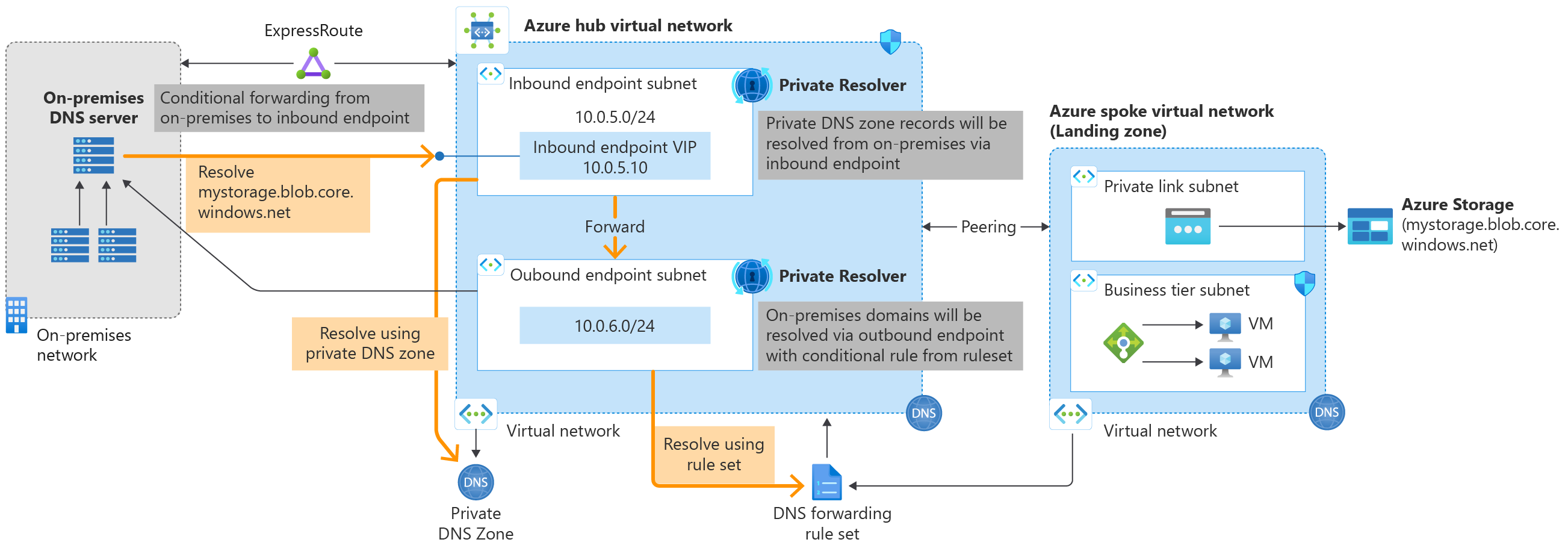
Azure DNS Private Resolver enables hybrid DNS scenarios by bridging on-premises and Azure networks. It provides inbound and outbound endpoints for conditional forwarding without requiring a VM-based DNS solution.
Key Features
- Inbound Endpoint: Allows on-premises DNS servers to resolve Azure Private DNS zones by forwarding queries to a virtual IP (VIP) within your VNET
- Outbound Endpoint: Enables Azure resources to conditionally forward queries to on-premises or external DNS servers using forwarding rulesets
- No Infrastructure Management: Fully managed service that eliminates the need for DNS VMs
Create a DNS Resolver:
az dns-resolver create --name MyResolver --resource-group MyResourceGroup --location eastus --vnet MyVNet
az dns-resolver inbound-endpoint create --dns-resolver-name MyResolver --name InboundEndpoint --resource-group MyResourceGroup --location eastus --subnet InboundSubnet
az dns-resolver outbound-endpoint create --dns-resolver-name MyResolver --name OutboundEndpoint --resource-group MyResourceGroup --location eastus --subnet OutboundSubnet
Hybrid DNS Flow
- On-premises servers forward queries for Azure zones (e.g.,
*.azure.local) to the inbound endpoint VIP - Azure resources use outbound endpoints with forwarding rules to query on-premises DNS for corporate domains (e.g.,
*.corp.contoso.com) - Conditional forwarding rulesets map domain names to target DNS servers
Azure DNS Security Policy
Azure DNS Security Policy provides advanced security capabilities by filtering and logging DNS queries at the virtual network (VNet) level. This feature applies to both public and private DNS traffic within VNets, enabling protection against DNS-based threats.
Key Features
- DNS Traffic Filtering: Create rules to allow, block, or alert on DNS queries based on domain names
- Threat Intelligence Integration: Leverage Microsoft's managed Threat Intelligence feed to automatically block known malicious domains
- Comprehensive Logging: Send detailed DNS logs to Azure Storage, Log Analytics workspaces, or Event Hubs for monitoring and analysis
- VNet-Level Protection: Apply security policies directly to VNets for all resources within them
Core Components
DNS Traffic Rules
Rules are processed in priority order (100-65000, lower numbers = higher priority) and follow DNS hierarchy. Actions include:
- Allow: Permit queries and log them
- Block: Deny queries and log the block
- Alert: Permit queries but generate alerts
DNS Domain Lists
Collections of domain names that rules apply to. Support wildcards and can be associated with multiple rules across policies.
Virtual Network Links
Associate security policies with VNets (one policy per VNet, multiple VNets per policy). Policies only apply to VNets in the same Azure region.
Threat Intelligence Feed
A managed domain list powered by Microsoft's Security Response Center (MSRC) that provides continuous updates against newly detected malicious domains.
Configuration and Management
DNS Security Policies can be configured through the Azure portal or Azure PowerShell. The PowerShell cmdlets ship in the Az.DnsResolver module, and the resources use the DnsResolverPolicy naming convention.
Example PowerShell Commands:
# Create a DNS security policy
$policy = New-AzDnsResolverPolicy -Name "MySecurityPolicy" -ResourceGroupName "MyRG" -Location "EastUS"

# Create a domain list (note the trailing dots on FQDNs)
$domainList = New-AzDnsResolverDomainList -Name "BlockList" -ResourceGroupName "MyRG" -Location "EastUS" -Domain @("malicious.example.com.","bad.domain.")

# Create a DNS security rule that blocks the domain list
New-AzDnsResolverPolicyDnsSecurityRule -Name "BlockRule" -ResourceGroupName "MyRG" -DnsResolverPolicyName "MySecurityPolicy" -Location "EastUS" -Priority 100 -ActionType "Block" -ActionBlockResponseCode "SERVFAIL" -DnsResolverDomainList @{ id = $domainList.Id } -DnsSecurityRuleState "Enabled"

# Link the policy to a VNet
New-AzDnsResolverPolicyVirtualNetworkLink -Name "VNetLink" -ResourceGroupName "MyRG" -DnsResolverPolicyName "MySecurityPolicy" -Location "EastUS" -VirtualNetworkId "/subscriptions/.../vnet"
Use Cases
- Attack Prevention: Block name resolution for known malicious domains
- Compliance Monitoring: Log all DNS queries for audit and compliance requirements
- Threat Detection: Use alert mode to monitor suspicious DNS activity without blocking
- Hybrid Security: Extend DNS security policies to on-premises resources via VNet integration
Limitations
- Policies are regional (must match VNet location)
- Maximum 1000 security policies per subscription
- Up to 100 traffic rules per policy
- Domain lists limited to 2000 entries (or 100,000 for large lists)
Important Considerations and Limitations
VNET Linking for Private DNS Zones
When working with Azure Private DNS Zones, understanding VNET linking is crucial:
Registration vs Resolution Links:
- Registration Link: Automatically creates DNS records for VMs in the linked VNET (auto-registration). Only one VNET can have registration enabled per private DNS zone
- Resolution Link: Allows resources in the linked VNET to resolve names from the private DNS zone. Multiple VNETs can have resolution-only links
Common Gotchas:
- Single Registration VNET: You cannot enable auto-registration for multiple VNETs to the same private zone. If you need multiple VNETs to register records, you must manually manage DNS records or use separate zones
- Cross-Subscription Limitations: VNETs and Private DNS zones must be in the same Microsoft Entra tenant for auto-registration to work
- Peered VNETs: VNET peering alone does not enable DNS resolution. Each peered VNET needs its own link to the private DNS zone
- Record Cleanup: When auto-registration is enabled, DNS records are automatically deleted when VMs are stopped (deallocated) or deleted
- 100 VNET Link Limit: Each private DNS zone supports up to 100 VNET links (with only 1 registration-enabled)
Example:
# VNET1 with registration enabled (auto-creates DNS records)
az network private-dns link vnet create --resource-group MyRG --zone-name contoso.local --name Link1 --virtual-network VNET1 --registration-enabled true

# VNET2 with resolution only (can query, but doesn't auto-register)
az network private-dns link vnet create --resource-group MyRG --zone-name contoso.local --name Link2 --virtual-network VNET2 --registration-enabled false
Other Limitations
- Public DNS Zone Delegation: When delegating a domain to Azure DNS, NS record updates at your registrar can take time to propagate (TTL-dependent)
- Alias Records: ALIAS record support is limited to specific Azure resource types (Traffic Manager, CDN, Public IP, Front Door)
- DNSSEC: Supported for Azure Public DNS zones (see DNSSEC overview for details)
Why Use Azure DNS?
The main benefit is consolidation: your DNS records live in the same place as everything else, managed with the same RBAC, CLI, PowerShell, and Terraform tooling you already use. For private zones, it integrates directly with your VNets. For hybrid scenarios, the DNS Private Resolver handles conditional forwarding to on-premises DNS without a DNS VM to maintain. If you're already working in Azure, it's the straightforward choice for DNS management.
Common Scenarios
- Hosting your company's domain in Azure
- Internal name resolution for VMs and services using Private DNS Zones
- Hybrid DNS setups with on-premises DNS servers and Azure DNS Resolver