Azure ExpressRoute Overview
In this article
This post covers Azure ExpressRoute, Microsoft's dedicated private connectivity service for hybrid connectivity. If you haven't already, check out the Azure Networking Fundamentals post first for foundational concepts like VNets, subnets, and routing.
What Is Azure ExpressRoute?
ExpressRoute lets you extend your on-premises network into the Microsoft cloud over a private connection facilitated by a connectivity provider. Unlike a VPN, ExpressRoute traffic does not traverse the public internet.
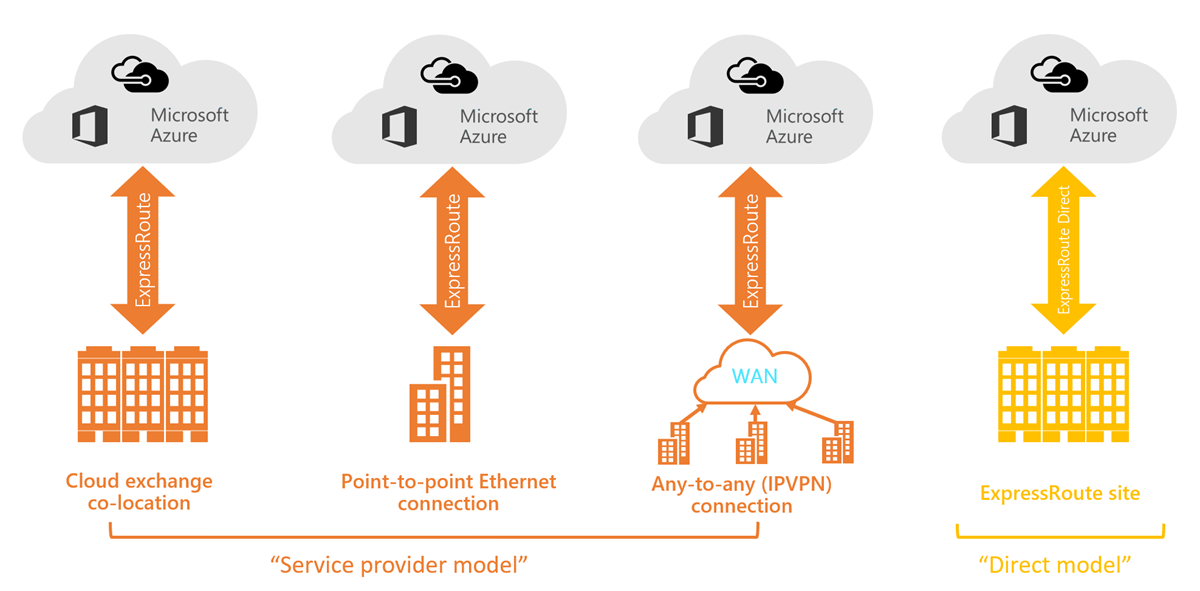
Connectivity is established in one of four ways:
- Any-to-any (IP VPN) network
- Point-to-point Ethernet network
- Virtual cross-connection through a colocation provider
- Direct connection at an ExpressRoute site (ExpressRoute Direct)
ExpressRoute connections offer:
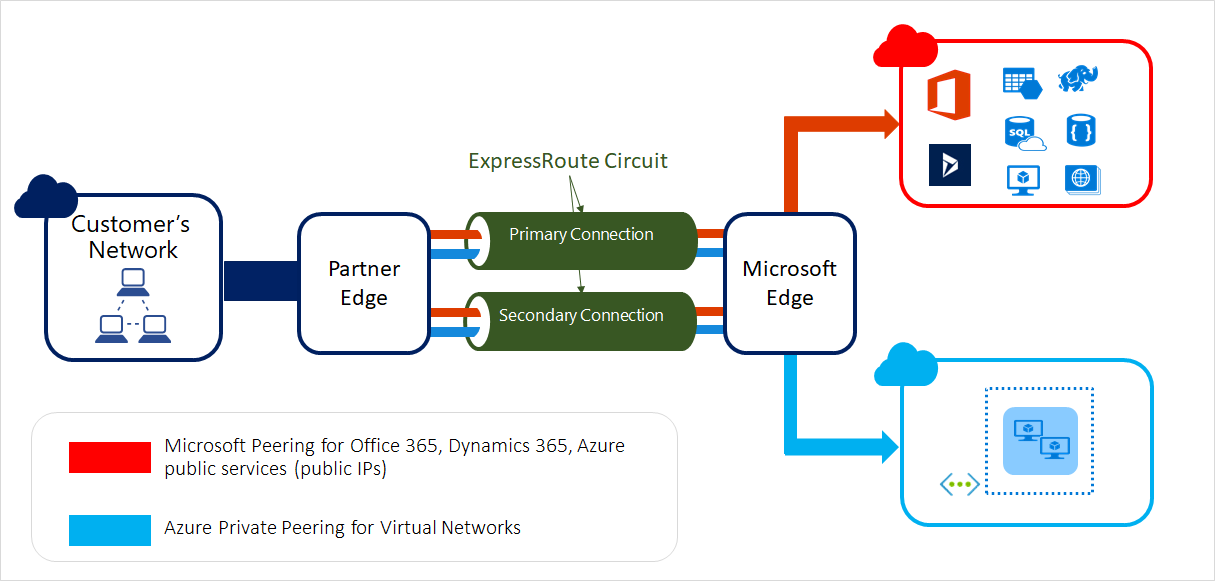
- Higher reliability — built-in redundancy via dual connections to two Microsoft Enterprise Edge routers (MSEEs)
- Faster speeds — from 50 Mbps up to 400 Gbps (via ExpressRoute Direct)
- Consistent latency — deterministic performance vs. internet variability
- Higher security — traffic never traverses the public internet
- SLA-backed uptime — covered by Microsoft's connection uptime SLA
Reference: What is Azure ExpressRoute?
When to Use ExpressRoute (vs. VPN Gateway)
ExpressRoute and VPN Gateway are both hybrid connectivity options, but they serve different needs:
| Factor | ExpressRoute | VPN Gateway |
|---|---|---|
| Path | Private (not internet) | Encrypted over internet |
| Bandwidth | Up to 400 Gbps (Direct) | Up to ~10 Gbps |
| Latency | Consistent / low | Variable |
| Availability SLA | Yes | Yes |
| Setup complexity | Higher (requires provider) | Lower |
| Cost | Higher | Lower |
| Use case | Mission-critical, high-throughput | Branch offices, disaster recovery |
Common enterprise use cases for ExpressRoute:
- Large-scale data migration to Azure
- Regulated industries requiring private connectivity (finance, healthcare, government)
- High-throughput workloads like Azure Storage ingestion or Azure Cosmos DB
- Extending a corporate WAN into Azure regions
Note: Microsoft 365 was designed to be accessed securely over the internet. ExpressRoute is recommended for Microsoft 365 only in specific scenarios.
Connectivity Models
ExpressRoute supports four connectivity models:
1. CloudExchange Colocation
If your datacenter or office is co-located in a facility with a cloud exchange (e.g., Equinix, Digital Realty), you can request a virtual cross-connection to Microsoft through the colocation provider's Ethernet exchange. Providers may offer Layer 2 or managed Layer 3 cross-connections.
2. Point-to-Point Ethernet
Connect your on-premises datacenter directly to a Microsoft peering location via a dedicated point-to-point Ethernet link. These providers typically offer Layer 2 connections.
3. Any-to-Any (IPVPN / MPLS)
Integrate your existing WAN (typically MPLS-based) with Microsoft cloud. The Microsoft cloud appears as just another branch on your WAN. Providers typically offer managed Layer 3 connectivity.
4. ExpressRoute Direct
Connect directly into Microsoft's global network at a peering location, no third-party provider in the middle. Supports dual 10 Gbps, 100 Gbps, or 400 Gbps connections in Active/Active configuration.
Best for: massive data ingestion, regulated industries requiring physical isolation, or granular per-business-unit circuit control.
Reference: ExpressRoute connectivity models
Circuit SKUs
Each ExpressRoute circuit has a SKU tier that determines its geographic reach and feature set:
| SKU | Geographic Reach | Route Limit | Notes |
|---|---|---|---|
| Local | Single Azure region near the peering location | Standard | Data transfer included in port charge |
| Standard | All regions within the same geopolitical region | 4,000 routes | Most common starting point |
| Premium | All Azure regions globally | 10,000 routes | Required for cross-geopolitical access |
Allowed SKU upgrades:
- Local → Standard or Premium (via CLI/PowerShell with Unlimited billing)
- Standard → Premium
Downgrade: Premium → Standard is supported; switching from Unlimited to Metered data is not supported.
Billing Models
- Unlimited data — Fixed monthly fee; all inbound and outbound data transfer included
- Metered data — Fixed monthly fee + per-GB charge for outbound data transfer
- Premium add-on — Unlocks global connectivity and increased route/VNet limits
Supported Bandwidth Options
ExpressRoute circuits are available at the following bandwidths. Your connectivity provider may not support all options, confirm with them before ordering.
50 Mbps | 100 Mbps | 200 Mbps | 500 Mbps
1 Gbps  | 2 Gbps   | 5 Gbps   | 10 Gbps
For ExpressRoute Direct: 10 Gbps, 100 Gbps, or 400 Gbps (dual ports, Active/Active).
You can increase bandwidth without tearing down existing connections. However, downgrades require recreating the circuit.
ExpressRoute Circuits and Peering
An ExpressRoute circuit is the logical connection between your on-premises infrastructure and Microsoft. It is identified by a unique GUID called a service key (s-key), which is shared between you, the connectivity provider, and Microsoft.
Each circuit supports up to two peering types:
Azure Private Peering
- Connects to Azure IaaS and PaaS resources deployed in a Virtual Network
- Traffic uses private IP addresses — treated as a trusted extension of your on-premises network
- Multiple VNets can be linked to a single circuit (limit varies by bandwidth and SKU)
- Supports IPv4 and IPv6; up to 4,000 prefixes by default (10,000 with Premium)
Microsoft Peering
- Connects to Microsoft 365 and Azure PaaS services (Storage, SQL, etc.)
- Requires public IP addresses owned by you or your connectivity provider
- Traffic flows bi-directionally between your WAN and Microsoft cloud services
- Supports IPv4 and IPv6; up to 200 prefixes per peering
Peering comparison at a glance:
| Azure Private Peering | Microsoft Peering | |
|---|---|---|
| Target | Azure VNet resources | Microsoft 365 / Azure PaaS |
| IP addressing | Private (RFC 1918) or public | Public IPs only |
| Max IPv4 prefixes | 4,000 (10,000 w/ Premium) | 200 |
| Max IPv6 prefixes | 100 | 200 |
| BGP sessions | Redundant pair per peering | Redundant pair per peering |
Each peering uses a pair of redundant BGP sessions, one to each MSEE, for high availability.
Reference: ExpressRoute circuits and peering
Key Design Considerations
Redundancy
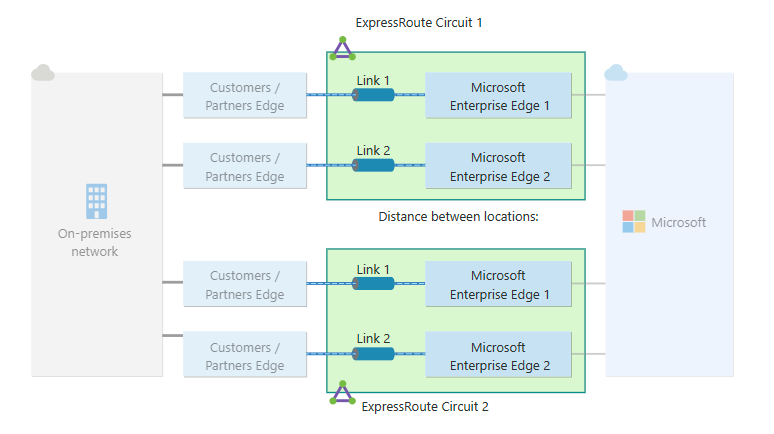
- Each ExpressRoute circuit has two connections to two MSEEs — built-in redundancy
- For maximum resiliency: deploy two circuits in two different peering locations
- For non-critical workloads: a single circuit with dual connections to one location provides standard resiliency
[On-Premises]
    |
    ├── Circuit A ── [Peering Location 1] ── MSEE-1a ──┐
    |                                        MSEE-1b ──┼── [Azure Region]
    └── Circuit B ── [Peering Location 2] ── MSEE-2a ──┤
                                             MSEE-2b ──┘
Global Reach
ExpressRoute Global Reach lets you connect two on-premises sites through Microsoft's backbone, useful for linking data centers in different regions without backhauling through your own WAN.
[Data Center - California] ── ExpressRoute ── [Microsoft Backbone] ── ExpressRoute ── [Data Center - Texas]
VNet Gateway Requirements
To connect a VNet to an ExpressRoute circuit, you need an ExpressRoute Virtual Network Gateway in a GatewaySubnet. Different gateway SKUs support different throughput limits, ensure the gateway SKU matches your circuit bandwidth expectations.
Routing
- ExpressRoute uses BGP (Border Gateway Protocol) for dynamic route exchange
- You must configure BGP sessions with Microsoft for each enabled peering
- If using Layer 2 connectivity, you are responsible for BGP configuration
- Recommended: keep private peering on your core network; put Microsoft peering in a DMZ
NAT Requirements
- Azure private peering: no NAT required — private IPs are acceptable
- Microsoft peering: public IP addresses required; if you use private IPs on-premises you must NAT before advertising routes to Microsoft
QoS
If you use Microsoft Teams, QoS is required to differentiate voice, video, and text traffic. Confirm QoS support with your connectivity provider.
Prerequisites Checklist
Before provisioning an ExpressRoute circuit:
- [ ] Active Azure subscription with
Microsoft.Networkresource provider registered - [ ] An ExpressRoute connectivity partner selected, or a cloud exchange provider identified
- [ ] Redundant BGP sessions planned for each peering location
- [ ] IP address plan confirmed (no overlap with existing on-premises or Azure ranges)
- [ ] NAT strategy defined if using Microsoft peering
- [ ] QoS plan if using Microsoft Teams
- [ ] For ExpressRoute Direct: subscription pre-enrolled via PowerShell before provisioning
Reference: ExpressRoute prerequisites & checklist
Monitoring
ExpressRoute circuits can be monitored using:
- ExpressRoute Network Insights — availability, VNet connectivity, bandwidth utilization
- Connection Monitor — health of private peering and Microsoft peering end-to-end
- Azure Monitor Metrics — circuit-level BGP availability, bits in/out, ARP availability
Reference: ExpressRoute Network Insights
Summary
| Detail | |
|---|---|
| What it is | Private, dedicated connection to Microsoft cloud via a provider |
| Connectivity models | CloudExchange, Point-to-Point, IPVPN, ExpressRoute Direct |
| SKUs | Local, Standard, Premium |
| Bandwidths | 50 Mbps – 10 Gbps (provider); 10/100/400 Gbps (Direct) |
| Peering types | Azure Private, Microsoft |
| Routing protocol | BGP (Layer 3) |
| Resiliency | Dual connections to dual MSEEs; max resiliency = 2 circuits, 2 locations |