Azure Networking Fundamentals
In this article
Before you start deploying workloads in Azure, it helps to understand how the networking layer actually fits together. This post covers the key concepts: VNets, subnets, NSGs, routing, peering, and private endpoints. If you haven't already, start with the Azure Platform Fundamentals overview first.
Virtual Networks (VNets) and Subnets
What Is a Virtual Network?
A VNet is a logically isolated network within Azure. It's the fundamental building block for your private network in Azure.
Key characteristics:
- Resources in a VNet can communicate with each other by default
- VNets are isolated from other VNets (unless you explicitly connect them)
- VNets are region-specific — a VNet in East US is separate from one in West US
- Free to create and use (you pay for resources deployed inside them)
Reference: Virtual Network Overview
What Is a Subnet?
A subnet is a subdivision of a VNet; think of it as a "room" within the "house."
Why use subnets?
- Security — Apply different security rules to different subnets
- Organization — Group resources by function (web tier, app tier, database tier)
- Service requirements — Some Azure services require dedicated subnets
Example VNet design:
VNet: 10.0.0.0/16 (65,536 IP addresses)
  ├── Subnet-Web:        10.0.1.0/24 (254 usable IPs) — Web servers
  ├── Subnet-App:        10.0.2.0/24 (254 usable IPs) — Application servers
  ├── Subnet-DB:         10.0.3.0/24 (254 usable IPs) — Database servers
  └── Subnet-Management: 10.0.4.0/24 (254 usable IPs) — Admin jump boxes
Key rules:
- Azure reserves 5 IPs in each subnet (first 4 + last 1)
- Subnets cannot overlap within a VNet
- You cannot change a subnet's address range after creation (must recreate)
Reference: Plan VNets
IP Address Planning
Private IP address ranges (RFC 1918):
| Range | Size |
|---|---|
| 10.0.0.0/8 | Largest (10.0.0.0 – 10.255.255.255) |
| 172.16.0.0/12 | Medium (172.16.0.0 – 172.31.255.255) |
| 192.168.0.0/16 | Smallest (192.168.0.0 – 192.168.255.255) |
Common approach:
- Use
10.x.x.xfor Azure networks - Each VNet gets a
/16(e.g., 10.50.0.0/16) - Each subnet gets a
/24(e.g., 10.50.1.0/24)
Avoid conflicts with: your on-premises network ranges, other VNets you might peer with, and common home router ranges (192.168.1.0/24).
Private Endpoints vs Service Endpoints
By default, many Azure services are accessible over the public internet (with authentication). For sensitive data, you want private connectivity.
Service Endpoints (Older, Simpler)
- Extend your VNet identity to Azure services
- Traffic stays on the Microsoft backbone (doesn't traverse the internet)
- The service still has a public IP address
- Cannot be used from on-premises over VPN/ExpressRoute
Pros: Simple to configure, no additional cost Cons: Less granular control, service retains a public address
Reference: Service Endpoints
Private Endpoints (Preferred)
- Assign a private IP from your VNet to an Azure service
- The service becomes accessible via private IP only
- Public access can be completely disabled
- Works from on-premises via VPN/ExpressRoute
Pros: No public IP, granular control, auditable Cons: ~$7.30/month per endpoint, requires DNS configuration
Reference: Private Endpoints
Decision Guide
| Scenario | Recommendation |
|---|---|
| Production workloads | Private Endpoints |
| Cost-sensitive dev/test | Service Endpoints |
| Internet-accessible services | Public + firewall rules |
Network Security Groups (NSGs)
An NSG is a set of firewall rules that control inbound and outbound traffic to Azure resources. Think of it as a "security guard" that checks every packet.
Key characteristics:
- Applied at subnet level or network interface (NIC) level
- Rules are evaluated by priority (lower number = higher priority)
- Stateful — return traffic is automatically allowed
- Applied to every resource in the subnet
Reference: NSG Overview
How NSG Rules Work
Each rule has:
- Priority — 100–4096 (lower = evaluated first)
- Direction — Inbound or Outbound
- Action — Allow or Deny
- Source / Destination — IP, CIDR, Service Tag, or ASG
- Protocol — TCP, UDP, ICMP, or Any
- Port Range — Single port or range
Example NSG for a web server subnet:
| Priority | Name | Direction | Action | Source | Port | Protocol |
|---|---|---|---|---|---|---|
| 100 | Allow-HTTPS | Inbound | Allow | Internet | 443 | TCP |
| 110 | Allow-HTTP | Inbound | Allow | Internet | 80 | TCP |
| 120 | Allow-SSH-Mgmt | Inbound | Allow | 10.0.4.0/24 | 22 | TCP |
| 65000 | Deny-All-Inbound | Inbound | Deny | Any | Any | Any |
Default Rules
Azure creates default rules with very high priority numbers (65000+):
- AllowVNetInBound — Allow traffic between resources in the same VNet
- AllowAzureLoadBalancerInBound — Allow health probes
- DenyAllInBound — Block everything else
Key takeaway: NSGs are "deny by default"; you must explicitly allow traffic.
Layered Security Pattern
- NSG at subnet level — Broad rules for all resources in the subnet
- NSG at NIC level — Specific rules for individual VMs
- Both are evaluated — the most restrictive rule wins
Service Tags
Instead of tracking IP ranges, use Service Tags:
- Internet — All public IPs
- VirtualNetwork — All IPs in VNet + connected VNets
- AzureLoadBalancer — Health probes
- Storage — All Azure Storage public IPs
- Sql — All Azure SQL public IPs
Reference: Service Tags
Routing (North-South and East-West Traffic)
Traffic Flow Terminology
East-West traffic: Traffic between resources within Azure (e.g., web server → database). Stays inside VNet or travels between peered VNets.
North-South traffic: Traffic between Azure and external networks (e.g., user → web server).
Azure Routing Basics
Azure automatically routes traffic within a VNet:
- Subnet A can reach Subnet B by default
- No configuration needed for basic VNet communication
System routes (automatic):
- Within VNet → Next hop: VNet
- To internet → Next hop: Internet
- Between peered VNets → Automatic routes created
Custom routes (User-Defined Routes / UDR): Override default behavior, such as:
- Force all internet traffic through a firewall appliance
- Route traffic through a VPN gateway
- Block internet access entirely
Reference: UDR Overview
VNet Peering
VNet peering connects two VNets, allowing resources to communicate as if they were on the same network.
Key characteristics:
- Low latency — traffic uses the Microsoft backbone, not the internet
- Works across regions (Global VNet Peering)
- Works across subscriptions
- Not transitive by default — A↔B and B↔C does NOT mean A↔C
Hub-and-Spoke Topology
The most common pattern:
Hub VNet (10.0.0.0/16) — Shared services
  ├── Peering → Spoke1 (10.1.0.0/16) — Finance app
  ├── Peering → Spoke2 (10.2.0.0/16) — HR app
  └── Peering → Spoke3 (10.3.0.0/16) — Marketing app
Benefits:
- Spoke VNets remain isolated from each other
- Hub hosts shared firewalls, VPN gateways, monitoring
- Easier to manage than fully meshed peering
Peering Costs
| Direction | Cost |
|---|---|
| Ingress (incoming) | Free |
| Same-region egress | ~$0.01/GB |
| Cross-region egress | ~$0.05/GB |
Reference: VNet Peering, Hub-Spoke Architecture
Azure Firewall and Egress Control
Azure Firewall
A managed, cloud-native firewall service providing network and application-level filtering.
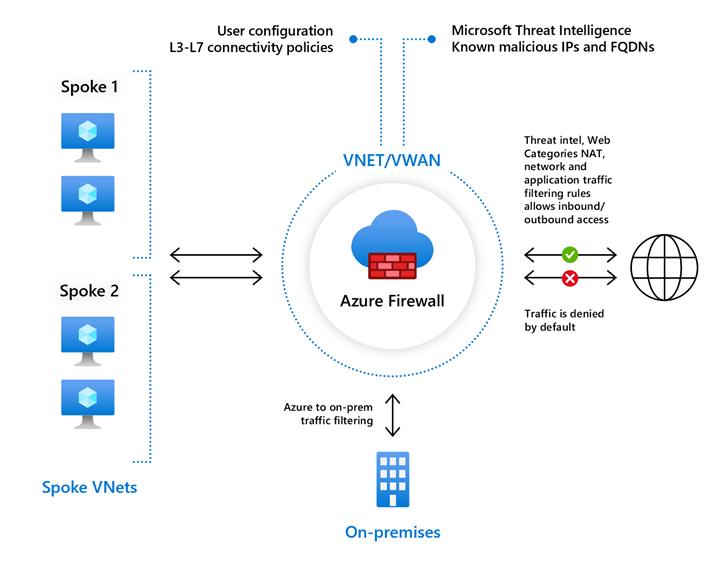
Key features:
- Centralized logging and analytics
- Threat intelligence filtering
- FQDN filtering (allow traffic to specific domain names)
- Network rules (IP/port-based) and application rules (HTTP/HTTPS-based)
When to use: Centralized outbound internet filtering, advanced threat protection, compliance requirements for egress inspection.
Reference: Azure Firewall
Egress Traffic Control
By default, Azure resources can access the internet and all outbound traffic is allowed (unless an NSG blocks it).
Best practice approaches:
- Allow-list — Block all outbound by default, explicitly allow needed destinations
- Azure Firewall — Route all outbound through a firewall for inspection
- Service Tags — Use NSGs with service tags to limit outbound to Azure services only
Key Takeaways
- VNets are isolated by default — you must explicitly connect them
- Use Private Endpoints for production workloads
- NSGs are deny-by-default — explicitly allow what you need
- Use hub-and-spoke topology for shared services
- Plan IP addresses carefully to avoid conflicts with on-premises ranges
Additional Resources
- Virtual Network Overview
- NSG How It Works
- Private Link Overview
- Hub-Spoke Reference Architecture
- Network Security Best Practices
This is part of the Azure Fundamentals Series. Return to the main guide to explore other topics.