New to Azure? Start Here
In this article
If you're just getting started with Azure, whether you're learning on your own, onboarding a team, or standing up a new environment, the sheer number of services, acronyms, and design decisions can feel overwhelming. This guide breaks down the foundational concepts you need to understand before deploying your first workload.
Cloud Adoption Framework (CAF)
The Cloud Adoption Framework is Microsoft's proven guidance for cloud adoption. It isn't about specific Azure features; it's about the organizational processes and best practices that make cloud adoption successful.
CAF Phases
- Strategy — Why are we moving to the cloud? (Cost savings, agility, innovation)
- Plan — What workloads move and when?
- Ready — Prepare landing zones (pre-built environments with security and networking)
- Adopt — Actually migrate or build applications
- Migrate — Lift-and-shift existing workloads
- Modernize — Replatform or refactor for cloud efficiency
- Cloud-native — Build new solutions using cloud-first patterns
- Govern — Enforce policies and standards
- Manage — Day-to-day operations and monitoring
- Secure — Continuously improve security posture across all phases
As of 2025, CAF distinguishes between Foundational methodologies (Strategy through Adopt, run sequentially) and Operational methodologies (Govern, Manage, Secure), which run continuously throughout the cloud journey.
CAF Strategy Phase
The Strategy phase answers three questions:
- WHY are we moving to cloud?
- WHAT business outcomes do we expect?
- WHO needs to be involved in decisions?
Common motivations include cost savings, agility, improved security posture, modernization of legacy systems, and better business continuity and disaster recovery capabilities.
CAF Plan Phase
The Plan phase answers:
- WHAT workloads move and in what order?
- Do we have the skills to do this?
- What does our migration roadmap look like?
Key planning artifacts CAF recommends:
- Digital estate assessment — inventory of all apps and infrastructure
- Workload prioritization — which apps move first (low risk vs. high value)
- Skills gap assessment — who needs training or hiring
- Adoption plan — 90-day, 6-month, and 1-year milestones
The 8Rs Decision Framework
For each workload, CAF provides a decision framework:
| Decision | Description |
|---|---|
| Retire | Decommission apps no longer needed |
| Retain | Keep on-prem (too complex or not worth moving yet) |
| Rehost | Lift and shift, move the VM as-is to Azure IaaS |
| Replatform | Minor optimizations (e.g., move to Azure SQL Managed Instance) |
| Refactor | Code changes to use cloud-native capabilities |
| Rearchitect | Redesign the app for cloud-native patterns |
| Rebuild | Rewrite from scratch as a cloud-native app |
| Replace | Swap for a SaaS product (e.g., move HR system to Workday) |
CAF Ready Phase: Landing Zones
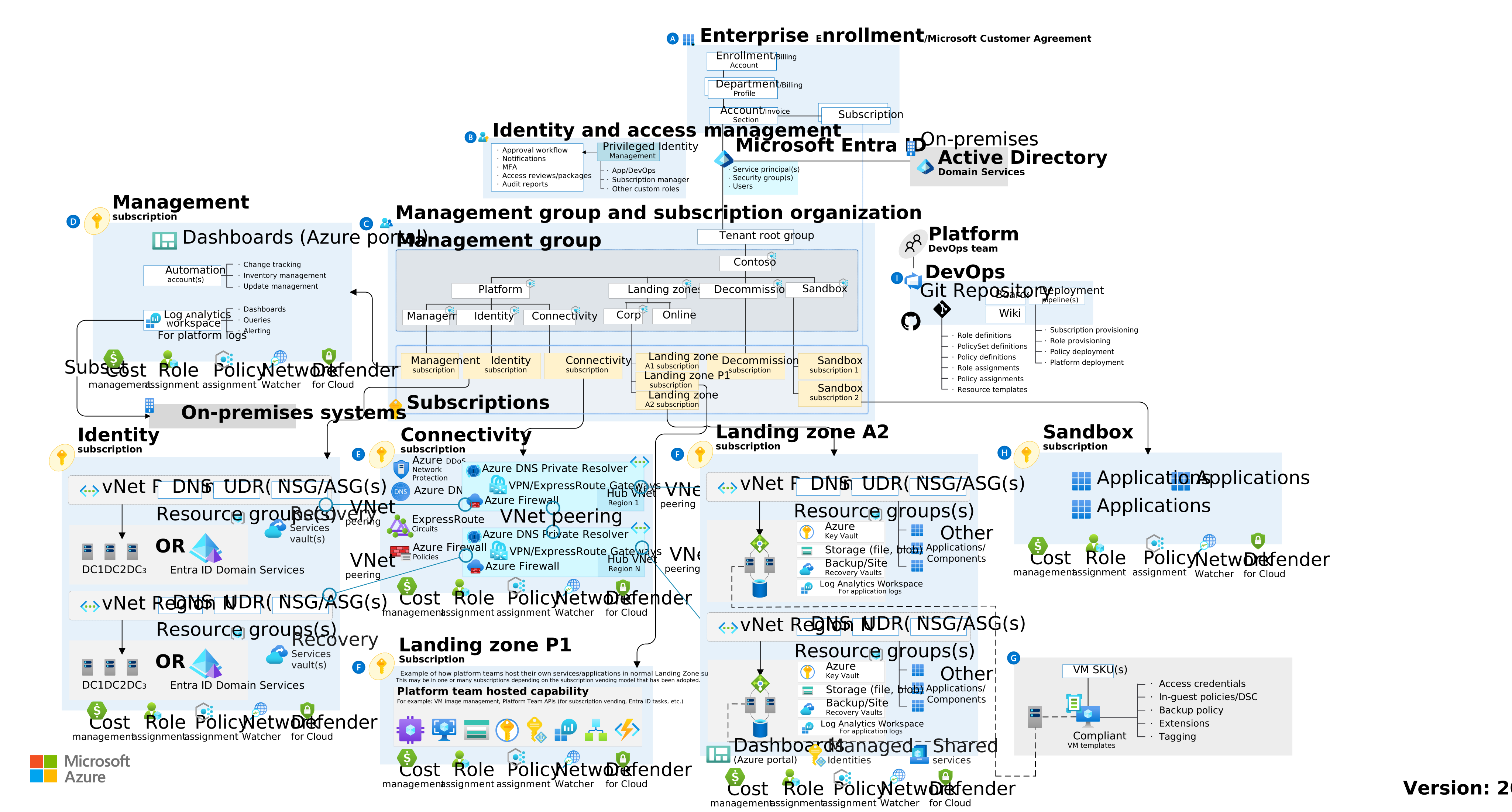
A landing zone is a pre-configured, pre-secured Azure environment that includes:
- Networking — Hub-spoke topology, firewall, private DNS
- Identity — Entra ID integration, RBAC roles defined
- Security — Policies enforced, Defender for Cloud enabled
- Cost management — Budgets, tags, billing alerts
- Governance — Azure Policy assignments in place
Think of it like a move-in-ready apartment versus an empty lot. An empty lot means you build everything from scratch (risky, inconsistent). A landing zone is a pre-built unit with utilities connected and security locks installed.
Landing zones prevent shadow IT, ensure compliance baselines are in place from day one, and create a repeatable pattern for onboarding new workloads.
Reference: Landing Zone Architecture
CAF Operating Models
Before diving deeper, it helps to understand how organizations typically operate Azure:
Centralized: A single IT team manages all Azure resources. Business units submit requests; the central team deploys. Consistent security and governance, but slower for teams needing agility.
Decentralized: Each department manages their own Azure environment with no central guardrails. Fast and autonomous, but risks inconsistent security and cost sprawl.
Shared Management (Recommended by CAF): The platform team owns core networking, identity, and security guardrails. Business units own application deployments within those guardrails. Landing zones are what make this model work.
Well-Architected Framework (WAF)
While CAF guides your cloud adoption journey, the Well-Architected Framework guides how you build and run workloads once you're in the cloud. WAF is organized around five pillars:
- Reliability — Ability to recover from failures and continue functioning
- Security — Protecting applications and data from threats
- Cost Optimization — Managing costs to maximize value
- Operational Excellence — Operations processes that keep a system running in production
- Performance Efficiency — Ability of a system to adapt to changes in load
Cloud Models: Public, Private, and Hybrid
Private Cloud
- Infrastructure operated solely for a single organization
- Can be hosted on-premises or by a third party
- Full control over security, compliance, and resources
- Higher cost, but maximum control
Public Cloud
- Resources owned and operated by a third-party provider (like Azure)
- No capital hardware purchases — pay-as-you-go
- Massive scale, global availability, rapid provisioning
Hybrid Cloud
- Combines private cloud (on-premises) with public cloud (Azure)
- Applications run in the most appropriate location
- Most common model for organizations in transition
| Model | CapEx | Control | Flexibility | Scalability |
|---|---|---|---|---|
| Private | High | Full | Low | Limited |
| Public | None | Shared | High | Unlimited |
| Hybrid | Medium | Blended | High | High |
CapEx vs. OpEx and the Consumption-Based Model
Capital Expenditure (CapEx): Upfront spending on physical infrastructure. Buy servers, storage, and networking equipment. Value depreciates over time on a 3–5 year hardware lifecycle.
Operational Expenditure (OpEx): Spending on services as you consume them. No upfront hardware costs. Costs scale with usage: use more, pay more; use less, pay less.
Consumption-Based Model: You only pay for cloud resources you actually use. Billing is based on consumption metrics: VM running hours, storage GBs used, database DTUs consumed, and so on.
Reference: Cost Model
Benefits of Cloud Computing
Eight key benefits that define the value of cloud:
- High Availability — Resources remain accessible even during failures. Azure SLA guarantees uptime percentages (99.9%, 99.99%).
- Scalability — Increase or decrease resources to match demand. Vertical scaling (scale up) adds more CPU/RAM; horizontal scaling (scale out) adds more instances.
- Elasticity — Automatic scaling in response to demand spikes — and automatic scale-down when demand decreases.
- Reliability — Ability to recover from failures and continue functioning. Azure's 60+ regions enable multi-region deployments with no single point of failure.
- Predictability — Confidence in both cost (budgets, pricing calculator) and performance (autoscaling, load balancing).
- Security — Robust security tools and infrastructure. Azure provides DDoS protection, firewalls, encryption, and threat detection — but you must configure them.
- Governance — Azure Policy, templates, and audit tools ensure deployed resources meet organizational and regulatory standards.
- Manageability — Two aspects: management of the cloud (auto-scaling, monitoring, alerts) and management in the cloud (Portal, CLI, PowerShell, APIs, Infrastructure as Code).
Key distinction: Scalability is the ability to adjust resources. Elasticity is automatic adjustment. Reliability is recovering from failure. High availability is remaining accessible during failure.
Tenant and Subscription Design
What is an Azure Tenant?
An Azure tenant is your organization's dedicated instance of Microsoft Entra ID. It's the root account for your organization in Azure.
- One organization typically has one tenant
- Contains all users, groups, and service principals
- One tenant can have unlimited subscriptions
What is an Azure Subscription?
A subscription is a billing and access boundary. It's where resources get deployed and costs accumulate.
Common subscription design patterns:
- By Environment — Dev, Test, Prod
- By Business Unit — Marketing, Finance, IT
- By Application — App1, App2
- Hybrid — Production-Finance, Production-Marketing, NonProd-Shared
When to create a new subscription:
- Different billing owner
- Different compliance boundary
- Different environment type (Production must be isolated from Dev/Test)
- Subscription is approaching resource limits
- Need to apply completely different governance policies
Naming Conventions
CAF recommends a consistent naming pattern for subscriptions:
<org>-<purpose>-<environment>
Examples: contoso-platform-prod, contoso-hrapp-dev, contoso-cjis-prod
Tags
Tags are key-value pairs applied to resources, resource groups, and subscriptions. They're essential for cost allocation, governance, and operations.
Recommended minimum tag set:
| Tag | Example Value |
|---|---|
| Department | "Engineering" |
| Environment | "prod" |
| CostCenter | "CC-12345" |
| Owner | "jane.doe@contoso.com" |
| Application | "HRSystem" |
| Compliance | "HIPAA" / "None" |
Tip: Use Azure Policy to require tags on resource groups. Without enforcement, tags become inconsistent within months.
Reference: Tagging Strategy
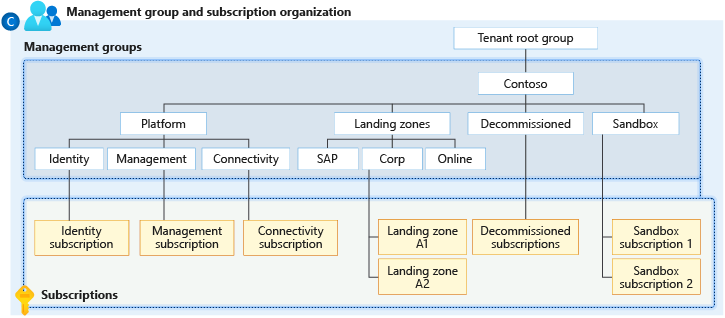
Azure Resource Hierarchy
The hierarchy from top to bottom:
Tenant (Root)
  └── Management Groups (Optional organizing containers)
      └── Subscriptions (Billing + access boundary)
          └── Resource Groups (Logical containers)
              └── Resources (VMs, databases, storage accounts, etc.)
Management Groups
Optional organizational folders for subscriptions. Useful when you have 10+ subscriptions. Policies applied here cascade down to all child subscriptions.
Reference: Management Groups
Resource Groups
Logical containers for resources that share the same lifecycle. When you delete a resource group, all resources inside are deleted. A resource can only belong to one resource group at a time.
Best practices:
- Group resources that are deployed, updated, and deleted together
- Use consistent naming (e.g.,
rg-marketing-web-prod-eastus) - Don't mix environments (dev + prod) in the same resource group
Policy and RBAC Inheritance
Policies and role assignments applied at a higher scope flow down to all children:
- A policy at the Management Group level is inherited by all subscriptions below it
- An RBAC role assigned at the subscription level applies to all resource groups inside
Best practice: Assign roles at the lowest scope that works. This is the principle of least privilege.
Resource Naming Conventions
CAF recommends this pattern:
<resource-type>-<workload>-<environment>-<region>-<instance>
| Example | Description |
|---|---|
rg-hrapp-prod-eastus |
Resource Group |
vm-webserver-prod-eastus-01 |
Virtual Machine |
st-hrfiles-prod-eastus |
Storage Account (no dashes allowed) |
sql-hrdb-prod-eastus |
SQL Server |
vnet-hub-prod-eastus |
Virtual Network |
kv-erp-prod-eastus |
Key Vault |
Reference: Naming Conventions
Service Models: IaaS, PaaS, and SaaS
IaaS (Infrastructure as a Service)
You rent servers, storage, and networking. You manage the OS, middleware, runtime, applications, and data. Azure manages physical hardware and the hypervisor.
Azure examples: Virtual Machines, Virtual Networks, Storage Accounts
When to use: Maximum control, lift-and-shift migrations, custom software stacks
PaaS (Platform as a Service)
Azure manages infrastructure and the platform (OS, patching, scaling). You manage applications and data.
Azure examples: Azure App Service, Azure SQL Database, Azure Functions
When to use: Faster deployment, less operational overhead, focus on code
SaaS (Software as a Service)
Fully managed applications. You just use the software.
Azure examples: Microsoft 365, Dynamics 365
Responsibility Comparison
| Layer | IaaS | PaaS | SaaS |
|---|---|---|---|
| Data & Access | You | You | You |
| Applications | You | Shared | Shared |
| Runtime/Middleware | You | Azure | Azure |
| Operating System | You | Azure | Azure |
| Physical Infrastructure | Azure | Azure | Azure |
Quick Decision Guide
- Need full OS control? → IaaS
- Want to deploy code without managing servers? → PaaS
- Need a ready-to-use application? → SaaS
Common IaaS mistake: Forgetting to patch the OS. Azure does not auto-patch VMs unless you enable Azure Update Manager. Unpatched VMs are a leading cause of security breaches in Azure.
For most new development: PaaS first, IaaS only when required.
Shared Responsibility Model
In traditional on-premises, you manage everything. In Azure, responsibilities are shared and the dividing line depends on the service model.
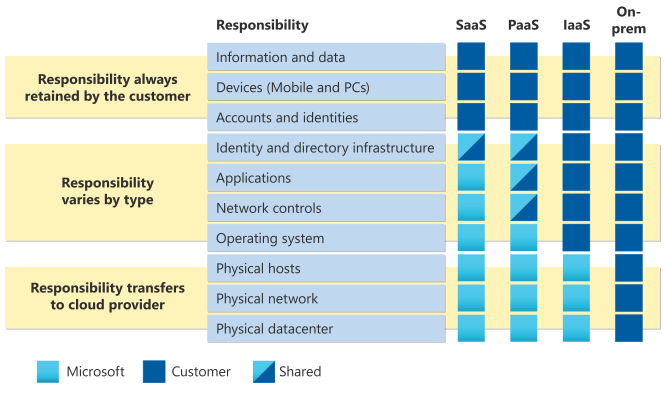
Full Responsibility Matrix
| Layer | On-Prem | IaaS | PaaS | SaaS |
|---|---|---|---|---|
| Data & Access | You | You | You | You |
| Configurations | You | You | You | You |
| Identities & Users | You | You | You | You |
| Client Devices | You | You | You | Shared |
| Applications | You | You | Shared | Shared |
| Network Controls | You | You | Shared | Azure |
| Runtime/Middleware | You | You | Azure | Azure |
| Operating System | You | You | Azure | Azure |
| Physical Hosts | You | Azure | Azure | Azure |
| Physical Network | You | Azure | Azure | Azure |
| Physical Datacenter | You | Azure | Azure | Azure |
Four Responsibilities You Always Retain
Regardless of service model, you always own:
- Data — Classification, protection, encryption decisions, and compliance
- Endpoints — Protecting client devices that access cloud services
- Accounts — Creating, managing, and removing user access
- Access management — RBAC, MFA, and Conditional Access policies
AI Shared Responsibility (2025)
When using Azure AI services (Azure OpenAI, Copilot, etc.), Microsoft secures AI infrastructure and model hosting. Your organization is responsible for prompt security, sensitive data protection, mitigating prompt injection risks, and AI governance.
Reference: Shared Responsibility
Common Misconception
Azure provides security tools, but you must configure and use them. A storage account left publicly accessible is the customer's responsibility. An unpatched VM is the customer's responsibility. An account without MFA is the customer's responsibility.
Regional Design and Availability
What is an Azure Region?
A region is a geographic area containing one or more datacenters connected by low-latency networks.
Why regions matter:
- Compliance — Data sovereignty laws may require data in specific countries
- Performance — Deploy close to users for lower latency
- Cost — Pricing varies by region
- Features — Not all services are available in all regions
Availability Zones
Within some regions, Azure has multiple isolated datacenters called Availability Zones. Each zone has independent power, cooling, and networking, connected with high-speed fiber (< 2ms latency).
For high availability, deploy resources across zones so that a datacenter-level failure doesn't take down your application.
Region Pairs and Nonpaired Regions
Historically, most Azure regions were paired with another region in the same geography for disaster recovery:
- East US ↔ West US
- North Europe ↔ West Europe
Benefits of paired regions:
- Azure updates one region at a time (not both simultaneously)
- Geo-redundant storage replicates to the paired region by default
- In massive outages, one region in each pair gets priority recovery
Important (2025 update): Newer Azure regions are not paired. They provide redundancy through multiple Availability Zones within the region. Always verify your target region's pairing status before designing a DR strategy.
Reference: Region Pairs
Sovereign Regions
Azure operates special isolated cloud instances for specific regulatory needs:
Azure Government: A physically separate instance of Azure located in US-only datacenters. Accessible only to screened, authorized US government personnel. Meets FedRAMP High, CJIS, DoD IL2/4/5/6, and ITAR compliance. Has its own portal at portal.azure.us.
Azure China (21Vianet): A physically separated instance operated by 21Vianet. All data stays within China to comply with Chinese data regulations.
SLA Tiers
| Configuration | SLA | Annual Downtime |
|---|---|---|
| Single VM (no AZ) | 99.9% | ~8.8 hours |
| VM with Availability Set | 99.95% | ~4.4 hours |
| VM across Availability Zones | 99.99% | ~52 minutes |
| Azure App Service (Standard+) | 99.95% | ~4.4 hours |
Important: Azure SLAs cover platform availability. Your application SLA depends on your architecture decisions.
Design Guidance for Beginners
- Start in one region closest to your users
- Use Availability Zones if your workload requires 99.99% uptime
- Add a second region if you need disaster recovery
- For PaaS services, use the zone-redundant tier when available
- For IaaS, deploy VMs into different zones with a load balancer
Additional Resources
Microsoft Learn Paths (Free):
- Azure Fundamentals (AZ-900)
- Cloud Adoption Framework
- Azure Governance Strategy
- Well-Architected Framework
Official Documentation:
- CAF Overview
- Landing Zone Architecture
- Resource Naming
- Tagging Strategy
- Shared Responsibility
- Availability Zones
- Azure Regions
Ready to Explore the Next Fundamental Topic?
This post covered the Azure platform foundations. The series continues with deep dives into each core area. Pick whichever topic is most relevant to you:
- Networking Fundamentals — VNets, subnets, private endpoints, NSGs, routing, peering, and firewall concepts
- Identity & Access Management — Authentication vs authorization, managed identities, RBAC, least privilege, and identity lifecycle
- Storage & Database Fundamentals — Redundancy, access tiers, blob/file/table/queue storage, SQL vs NoSQL, and managed database services
- Monitoring & Incident Response — Metrics, logs, traces, Log Analytics, alerting, Sentinel, and shared IR responsibilities
- Governance, Cost & Tagging — Cost hierarchy, billing models, cost drivers, resource organization, and tagging strategies
- BCDR Fundamentals — Region pairs, backup best practices, Site Recovery patterns, RTO/RPO, and resiliency tiers