Azure Storage & Database Fundamentals
In this article
This post covers how data storage and databases work in Azure: from storage accounts and access tiers to SQL vs NoSQL and when each service makes sense. If you haven't already, start with the Azure Platform Fundamentals overview first.
Storage Account Fundamentals
A Storage Account is a scalable, durable, and highly available storage service for unstructured data. It's one of Azure's most fundamental services.
Key characteristics:
- Globally unique namespace:
mystorageaccount.blob.core.windows.net - Region-specific (data stored in your chosen region)
- Supports multiple data types (blobs, files, queues, tables)
- Pay only for data stored + operations performed
- 99.9%–99.99% availability SLA (depending on redundancy)
Reference: Storage Account Overview
Performance Tiers
Standard (General Purpose v2):
- Uses HDD, lower cost per GB
- Good for: Backups, archives, infrequently accessed data
Premium (Specialized):
- Uses SSD, sub-millisecond latency
- Three types: Premium Block Blobs, Premium File Shares, Premium Page Blobs
- Good for: High IOPS workloads, enterprise file shares, VM disks
Default choice: Standard General Purpose v2 for most workloads.
Storage Redundancy
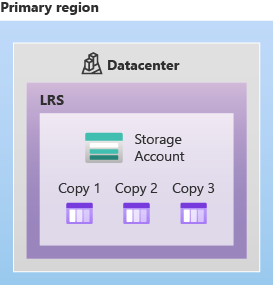
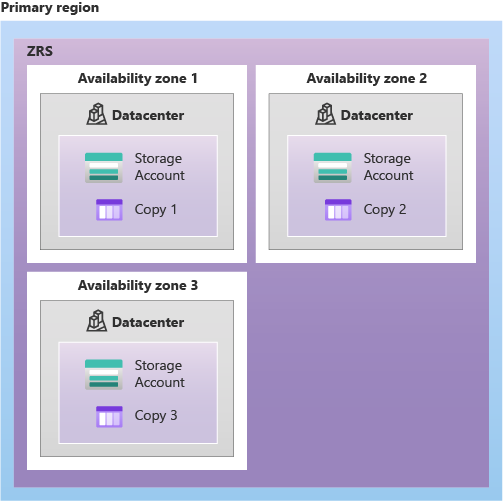
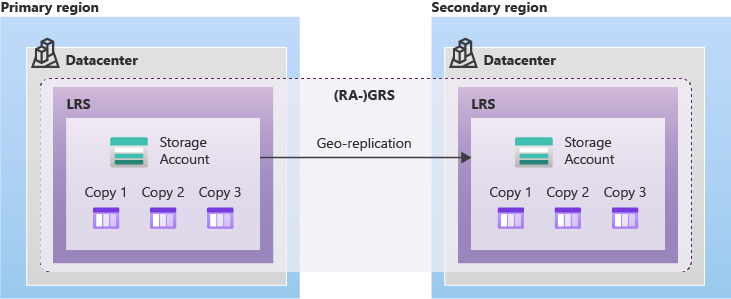
Azure stores multiple copies of your data for durability. You choose the redundancy level based on requirements and budget.
| Redundancy | Copies | Locations | Protects Against | Durability |
|---|---|---|---|---|
| LRS (Locally Redundant) | 3 | 1 datacenter | Disk/rack failures | 11 nines |
| ZRS (Zone-Redundant) | 3 | 3 Availability Zones in 1 region | Datacenter failures | 12 nines |
| GRS (Geo-Redundant) | 6 | 2 regions (LRS in each) | Regional disasters | 16 nines |
| GZRS (Geo-Zone-Redundant) | 6 | Primary: 3 AZs, Secondary: LRS | Datacenter + region failures | 16 nines |
Read-access variants: RA-GRS and RA-GZRS allow you to read from the secondary region, useful when you need data access during a primary region outage.
When to Use What
| Scenario | Redundancy |
|---|---|
| Dev/test, non-critical data | LRS |
| Production data, high availability | ZRS |
| Business-critical, disaster recovery | GRS |
| Mission-critical, highest availability | GZRS |
Reference: Storage Redundancy
Storage Access Tiers
Azure offers different "temperatures" for blob storage based on access frequency. Colder storage = cheaper per GB but more expensive to access.
| Tier | Access Pattern | Min Duration | Storage Cost | Access Cost |
|---|---|---|---|---|
| Hot | Daily/weekly | None | Highest | Lowest |
| Cool | Monthly | 30 days | Lower | Higher |
| Cold | Every few months | 90 days | Even lower | Even higher |
| Archive | Yearly or less | 180 days | Lowest (~$0.002/GB) | Highest (offline) |
Archive tier: Data is offline and must be rehydrated before access (takes 1–15 hours).
Lifecycle Management
Set policies to automatically move data between tiers:
- Day 0 → Upload to Hot tier
- After 30 days → Move to Cool
- After 90 days → Move to Cold
- After 365 days → Move to Archive
- After 2,555 days (7 years) → Delete
Reference: Access Tiers, Lifecycle Management
Storage Data Types
A single Storage Account can contain multiple types of data services.
Blob Storage (Binary Large Objects)
Unstructured data: images, videos, logs, backups, documents. Organized in containers (like folders), accessed via HTTP/HTTPS.
Three blob types:
- Block Blobs — Text and binary data (most common, up to 190.7 TB)
- Append Blobs — Optimized for append operations (e.g., log files)
- Page Blobs — Random access, used for VM disks
Reference: Blob Storage
Azure Files
Fully managed file shares accessible via SMB or NFS protocols. Can be mounted like a network drive (Z: drive).
Key features: Simultaneous access from multiple VMs, snapshot support, on-premises caching with Azure File Sync.
Use case: Lift-and-shift file server migration, shared application configurations, container persistent volumes.
Reference: Azure Files
Table Storage (NoSQL Key-Value)
Schema-less NoSQL key-value store for structured, non-relational data. Cheap and fast for simple queries.
Use case: Session state, user profiles, device metadata.
Limitations: No complex queries (joins/aggregations), max entity size 1 MB.
Queue Storage (Message Queue)
Message queue for asynchronous communication. Stores millions of messages, each up to 64 KB.
How it works: Producer writes message → message persists → consumer reads and processes → consumer deletes message.
Use case: Decoupling application components, background job processing, order processing pipelines.
Decision Guide
| Need | Storage Type |
|---|---|
| Images, videos, backups | Blob Storage |
| Replace file server / network drive | Azure Files |
| Simple key-value data, low cost | Table Storage |
| Asynchronous message passing | Queue Storage |
SQL vs NoSQL Databases
SQL (Relational)
- Structured data in tables with defined schema
- Relationships between tables (foreign keys)
- ACID transactions (Atomicity, Consistency, Isolation, Durability)
- SQL query language (SELECT, JOIN, etc.)
- Strong consistency
When to use: Data has clear relationships, need complex queries, require strong consistency (banking, e-commerce).
NoSQL (Non-Relational)
- Flexible schema (schema-less or dynamic)
- No strict relationships
- Horizontal scaling (add more servers)
- Eventual consistency (in distributed scenarios)
NoSQL categories:
| Category | Description | Example Service | Use Case |
|---|---|---|---|
| Document | JSON/BSON documents | Cosmos DB, MongoDB | Product catalogs, user profiles |
| Key-Value | Simple lookups by key | Table Storage, Redis | Session state, caching |
| Column-Family | Optimized for reading columns | Cassandra | Time-series, analytics |
| Graph | Relationships as first-class objects | Cosmos DB Gremlin | Social networks, recommendations |
Comparison
| Aspect | SQL (Relational) | NoSQL (Non-Relational) |
|---|---|---|
| Schema | Fixed, predefined | Flexible, dynamic |
| Relationships | Foreign keys, joins | Embedded or references |
| Scaling | Vertical (bigger server) | Horizontal (more servers) |
| Consistency | Strong (ACID) | Eventual (BASE) |
| Best For | Complex queries, consistency | Scale, flexibility |
Reference: Data Store Overview
Managed vs Self-Managed Databases
Self-Managed (IaaS): SQL Server on Azure VM
- You manage: Patching, backups, high availability, scaling, security
- Azure manages: Physical hardware, hypervisor
- Full SQL Server feature access, complete control
- Higher operational overhead, more expensive
Like owning a house: full control, full responsibility.
Managed (PaaS): Azure SQL Database
- Azure manages: Patching, backups, high availability, scaling
- You manage: Database schema, queries, data
- Automatic point-in-time restore, built-in HA, easier scaling
- Some SQL Server features unavailable, less control
Like renting an apartment: less control, less responsibility.
Hybrid: Azure SQL Managed Instance
- Near 100% SQL Server compatibility in a managed service
- Automatic patching and backups
- Best for lift-and-shift with minimal changes
Decision Guide
| Need | Recommendation |
|---|---|
| Maximum SQL Server compatibility | SQL Managed Instance or VM |
| Modern cloud-native application | Azure SQL Database |
| Need third-party software installed | SQL Server on VM |
| Minimal operational overhead | Azure SQL Database |
| Migrating with minimal changes | SQL Managed Instance |
Core Azure Database Services
Azure SQL Database (PaaS)
Best for most relational workloads. Fully managed SQL Server engine with automatic backups (7–35 days), built-in HA (99.99% SLA), intelligent performance tuning, and a serverless option that auto-pauses when idle.
Purchasing models: DTU (simple fixed tiers) or vCore (choose CPU/memory independently).
Reference: Azure SQL Database
Azure Cosmos DB (Multi-Model NoSQL)
Best for global distribution, massive scale, and low latency. Supports document, key-value, graph, and column-family models. One-click replication to any region, multiple consistency levels, 99.999% availability SLA.
APIs: SQL, MongoDB, Cassandra, Gremlin, Table
Reference: Cosmos DB
Azure Database for PostgreSQL
Fully managed PostgreSQL with Flexible Server deployment option for more control. Supports extensions like PostGIS.
Reference: PostgreSQL Flexible Server
Azure Database for MySQL
Fully managed MySQL service supporting versions 5.7 and 8.0 with automatic backups and HA.
Azure Cache for Redis
Managed in-memory cache with microsecond latency. Used for session caching, full-page caching, and leaderboards.
Tiers: Basic (dev/test), Standard (production), Premium (clustering).
Reference: Azure Cache for Redis
Key Takeaways
- Choose redundancy based on data criticality — LRS for dev, GRS/GZRS for production
- Use access tiers and lifecycle policies to optimize storage costs
- Match data type to the right service — blobs for objects, files for shares, queues for messaging
- Choose SQL for relational data with complex queries, NoSQL for scale and flexibility
- Default to managed (PaaS) databases unless you need full server control
Additional Resources
- Storage Account Overview
- Storage Redundancy
- Access Tiers
- Azure SQL Database
- Cosmos DB Introduction
- Data Store Decision Guide
This is part of the Azure Fundamentals Series. Return to the main guide to explore other topics.