Azure Application Gateway WAF: Configuring Web Application Firewall for External Traffic
In this article
Azure Application Gateway WAF: Configuring Web Application Firewall for External Traffic
If you've read the Application Gateway overview post, you know what App Gateway does as a Layer 7 load balancer. This post is a deep dive into one specific capability: the Web Application Firewall. WAF is the reason most internet-facing App Gateways exist. Without it, you're exposing web applications directly to the internet with nothing between the request and your code except hope.
What WAF Actually Does
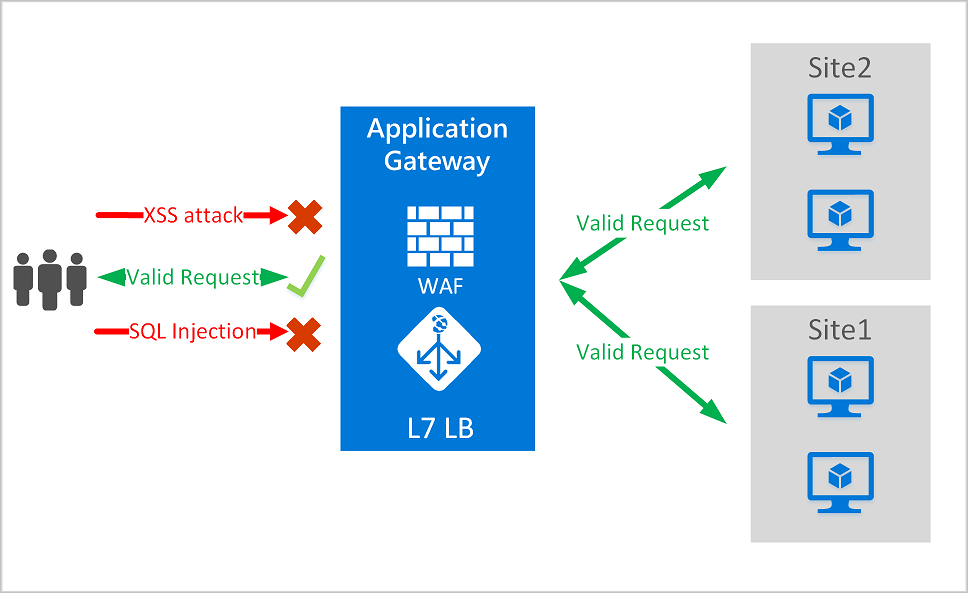
Azure WAF on Application Gateway is a reverse proxy firewall that inspects every HTTP/HTTPS request before it reaches your backend. It sits inline — every request passes through it, gets evaluated against a set of rules, and is either forwarded to the backend or blocked.
The WAF evaluates requests using two types of rules:
| Rule Type | What It Does | Priority |
|---|---|---|
| Custom rules | Rules you write — IP blocks, geo-filters, rate limits, header matches | Evaluated first |
| Managed rule sets | Pre-built rule sets maintained by Microsoft and OWASP | Evaluated after custom rules |
Custom rules always run first. If a custom rule matches and takes an Allow or Block action, managed rules don't run for that request. This means you can use custom rules to whitelist known-good traffic (like health probes or internal monitoring) so it never hits the heavier managed rule evaluation.
What It Replaces
If you're coming from an on-premises environment, you've probably been running one of these:
| Legacy Appliance | What It Did | App Gateway WAF Equivalent |
|---|---|---|
| F5 BIG-IP ASM | Application security module — OWASP rules, bot detection, IP reputation, L7 DDoS, iRules for custom logic | Managed DRS/CRS rule sets + custom rules + Bot Manager. No equivalent to iRules scripting — use custom rules and rewrites instead. |
| Imperva SecureSphere / WAF Gateway | On-prem WAF appliance with auto-learning, virtual patching, database activity monitoring | Managed rules + anomaly scoring. No auto-learning mode — you tune exclusions manually. No database monitoring — that's Microsoft Defender for SQL. |
| Barracuda WAF / CloudGen WAF | Reverse proxy WAF with URL protection, cookie security, cloaking, outbound data theft prevention | Managed rules + custom rules. No outbound DLP — use Azure Information Protection or Defender for Cloud for data exfiltration detection. |
| Citrix ADC / NetScaler AppFirewall | WAF integrated into the ADC with form field consistency checks, SQL/XSS protection, cookie tampering detection, response-side checks | Managed rules cover SQL/XSS. No form field consistency or response-body inspection — WAF inspects requests, not responses. |
| ModSecurity (Apache/Nginx) | Open-source WAF engine running OWASP CRS rules in front of web servers | Most direct equivalent. Azure WAF's CRS rules are derived from the same OWASP project. Migration is conceptually straightforward — map your custom SecRules to custom WAF rules. |
| AWS WAF | Cloud-native WAF with managed rule groups and custom rules | Functionally equivalent. Both use managed + custom rule model. Azure WAF uses OWASP-based rule sets; AWS uses AWS-managed and marketplace rule groups. |
The key difference between all of these and Azure WAF: you don't manage the appliance. No patching, no firmware updates, no capacity planning for the WAF engine itself. Microsoft maintains the rule sets, updates threat intelligence feeds, and runs the infrastructure. You configure policy.
What You Lose vs. On-Prem WAFs
Be honest about the gaps:
- No response-body inspection. Azure WAF inspects inbound requests only. If you need to scan responses for sensitive data leakage (credit card numbers, SSNs in error messages), you need a different tool — Microsoft Defender for Cloud or a third-party solution.
- No auto-learning / positive security model. Imperva and F5 can learn your application's normal behavior and auto-generate rules. Azure WAF uses a negative security model — it blocks known-bad patterns. You tune with exclusions, not learned baselines.
- No scripting engine. F5 iRules and Citrix responder policies let you write arbitrary logic. Azure WAF custom rules are condition-based (match variables + operators + actions), not Turing-complete scripts. For complex logic, move it to the application layer or use Azure API Management policies in front.
- Limited protocol support. Azure WAF handles HTTP/HTTPS, WebSocket, and HTTP/2. It doesn't inspect gRPC payloads, raw TCP, or non-HTTP protocols. For those, you need Azure Firewall or a network virtual appliance.
What You Gain
- Managed rule updates. Microsoft pushes DRS/CRS updates without you touching anything. New CVE drops on Tuesday, rule update is live by Thursday.
- Native Azure integration. WAF logs go to Log Analytics, Sentinel, Defender for Cloud. No syslog forwarders, no log parsing pipelines.
- Scale without capacity planning. WAF_v2 autoscales with traffic. No sizing exercises, no "we need a bigger box" conversations.
- Per-site and per-URI policies. One App Gateway, 40 sites, each with its own WAF policy. Try doing that with a single F5.
How External Traffic Flows Through WAF
Understanding the traffic flow matters for troubleshooting and architecture decisions.
Internet Client
      │
      ▼
┌─────────────────────────┐
│   Public IP (Frontend)  │
│   Application Gateway   │
│                         │
│  ┌───────────────────┐  │
│  │    WAF Engine      │  │
│  │  1. Custom rules   │  │
│  │  2. Managed rules  │  │
│  │  3. Bot Manager    │  │
│  └───────┬───────────┘  │
│          │               │
│  ┌───────▼───────────┐  │
│  │  Routing Rules     │  │
│  │  (path/host-based) │  │
│  └───────┬───────────┘  │
│          │               │
└──────────┼──────────────┘
           │
           ▼
  ┌─────────────────┐
  │  Backend Pool    │
  │  (VMs, VMSS,     │
  │   App Service,   │
  │   AKS, etc.)     │
  └─────────────────┘
Key points about this flow:
- TLS terminates at the gateway. The WAF can only inspect decrypted traffic. If you use end-to-end TLS (re-encrypt to backend), the WAF still inspects the decrypted request between termination and re-encryption.
- Client IP is in
X-Forwarded-For. The gateway is a terminating proxy — it opens a new connection to the backend. The original client IP is passed in theX-Forwarded-Forheader. Your application and any backend firewalls need to read this header, not the TCP source IP. - The WAF subnet needs a dedicated subnet. No other resources can live in the App Gateway subnet. NSGs on this subnet must allow inbound from the internet (or your expected source ranges) and the
GatewayManagerservice tag. - Health probes come from the gateway, not the client. Backend health probes originate from the App Gateway's private IP. Make sure your backend NSGs and application firewalls allow probe traffic.
Architecture Patterns for External Traffic
| Pattern | When to Use |
|---|---|
| App Gateway WAF → VMs/VMSS | Classic IaaS web apps. WAF protects, App Gateway load-balances across VMs. |
| App Gateway WAF → App Service | PaaS web apps. Use private endpoints on App Service so traffic only comes through the gateway, not directly from the internet. Set access restrictions on the App Service to allow only the App Gateway subnet. |
| App Gateway WAF → AKS (AGIC) | Kubernetes workloads. Application Gateway Ingress Controller makes the App Gateway the cluster's ingress, with WAF protecting all ingress traffic. |
| Front Door → App Gateway WAF → Backend | Global + regional. Front Door handles global routing and CDN. App Gateway provides per-region WAF inspection and routing. Lock App Gateway to only accept traffic from Front Door using the X-Azure-FDID header in a custom WAF rule. |
| App Gateway WAF (internal) → Backend | Internal-only apps accessed over VPN/ExpressRoute. Use a private frontend IP instead of public. WAF still inspects traffic — useful for protecting against lateral movement from compromised on-prem machines. |
Configuring WAF: Step by Step
Step 1: Create a WAF Policy
WAF configuration lives in a WAF Policy resource, not on the App Gateway itself. This is important — the old way of configuring WAF directly on the gateway (WAF Configuration) is deprecated and retires March 15, 2027. Always use WAF Policy.
-
Portal → search Web Application Firewall → select Create
-
Fill in the basics:
Setting Value Policy for Regional WAF (Application Gateway) Subscription Your subscription Resource group Same as your App Gateway Policy name waf-policy-prod -
On the Policy settings tab:
- WAF mode: Start with Detection. Switch to Prevention after you've reviewed logs and tuned exclusions.
- Max request body inspection size: 128 KB is the default. Increase if your app accepts large file uploads.
- File upload limit: 750 MB default. Reduce for APIs that shouldn't accept large files.
- Request body inspection: Leave enabled. Disabling it means the WAF only inspects headers and URL — most attacks are in the body.
-
On the Managed rules tab:
- Select DRS 2.2 (the latest and recommended rule set)
- Enable Bot Manager 1.1
- Review rule groups — all are enabled by default
-
On the Association tab:
- Associate with your Application Gateway (global), a specific listener, or a route path
- Global applies to all listeners; per-listener lets you use different policies for different sites
-
Review + create → Create
Step 2: Understand Managed Rule Sets
The Default Rule Set (DRS) 2.2 is the current recommended version. It's based on OWASP CRS 3.3.4 with additional Microsoft Threat Intelligence rules.
| Rule Group | What It Catches |
|---|---|
| REQUEST-911-METHOD-ENFORCEMENT | HTTP methods that shouldn't be allowed (TRACE, CONNECT, etc.) |
| REQUEST-913-SCANNER-DETECTION | Vulnerability scanner signatures (Nessus, Nikto, etc.) |
| REQUEST-920-PROTOCOL-ENFORCEMENT | Malformed HTTP (missing headers, invalid content-length, smuggling) |
| REQUEST-930-APPLICATION-ATTACK-LFI | Local file inclusion attempts (../../etc/passwd) |
| REQUEST-931-APPLICATION-ATTACK-RFI | Remote file inclusion (http://evil.com/shell.php) |
| REQUEST-932-APPLICATION-ATTACK-RCE | Remote command execution (shell commands in parameters) |
| REQUEST-933-APPLICATION-ATTACK-PHP | PHP-specific injection attacks |
| REQUEST-941-APPLICATION-ATTACK-XSS | Cross-site scripting in all its variations |
| REQUEST-942-APPLICATION-ATTACK-SQLI | SQL injection — the biggest category with 100+ rules |
| REQUEST-943-APPLICATION-ATTACK-SESSION-FIXATION | Session hijacking attempts |
| REQUEST-944-APPLICATION-ATTACK-JAVA | Java/Spring-specific attacks (Log4Shell, Spring4Shell) |
| MS-ThreatIntel-WebShells | Web shell upload detection (Microsoft Threat Intelligence) |
| MS-ThreatIntel-AppSec | Application-specific attack patterns (Microsoft Threat Intelligence) |
| MS-ThreatIntel-SQLI | Enhanced SQL injection detection (Microsoft Threat Intelligence) |
| MS-ThreatIntel-CVEs | Rules for specific CVEs (Microsoft Threat Intelligence) |
Anomaly Scoring
DRS 2.2 uses anomaly scoring by default. Instead of blocking on the first rule match, each matched rule adds to a cumulative score based on severity:
| Severity | Score Added |
|---|---|
| Critical | 5 |
| Error | 4 |
| Warning | 3 |
| Notice | 2 |
If the total score reaches 5 or higher and the WAF is in Prevention mode, the request is blocked. A single Critical match blocks immediately. Two Warning matches (3 + 3 = 6) also block. One Notice match (2) alone does not.
This is better than the old "block on first match" approach because it reduces false positives. A legitimate request that happens to trigger one low-severity rule isn't blocked — but a request that triggers multiple rules across different categories is almost certainly malicious.
Step 3: Configure Custom Rules
Custom rules handle scenarios that managed rules don't cover. Here are the most common patterns:
Geo-blocking
Block traffic from countries where you have no customers:
| Setting | Value |
|---|---|
| Rule name | block-non-us-traffic |
| Priority | 10 |
| Match type | Geo location |
| Match variable | RemoteAddr |
| Operator | GeoMatch |
| Match values | Select countries to allow |
| Negate | Yes (block everything NOT in the list) |
| Action | Block |
IP Allowlist / Blocklist
Allow only known IP ranges (corporate VPN, partner IPs):
| Setting | Value |
|---|---|
| Rule name | allow-corporate-only |
| Priority | 5 |
| Match variable | RemoteAddr |
| Operator | IPMatch |
| Match values | 10.0.0.0/8, 203.0.113.0/24 (your ranges) |
| Negate | Yes |
| Action | Block |
Rate Limiting
Limit requests per IP to prevent abuse:
| Setting | Value |
|---|---|
| Rule name | rate-limit-api |
| Priority | 20 |
| Rule type | Rate limit |
| Rate limit threshold | 100 requests |
| Rate limit duration | 1 minute |
| Group by | Client address |
| Match variable | RequestUri |
| Operator | Contains |
| Match values | /api/ |
| Action | Block |
Lock Down to Front Door
If Front Door sits upstream, reject traffic that bypasses it:
| Setting | Value |
|---|---|
| Rule name | require-frontdoor |
| Priority | 1 |
| Match variable | RequestHeaders |
| Selector | X-Azure-FDID |
| Operator | Equal |
| Match values | Your Front Door instance ID |
| Negate | Yes |
| Action | Block |
Step 4: Tune with Exclusions
After running in Detection mode, you'll see false positives in the WAF logs. Common triggers:
- Authentication tokens in headers or cookies triggering SQL injection rules (long base64 strings look like encoded attacks)
- Rich text editors sending HTML in POST bodies triggering XSS rules
- API payloads with SQL-like syntax in JSON fields
Create exclusions to suppress these:
- WAF Policy → Managed rules → Add exclusions
- Select which rule set to apply the exclusion to
- Choose the scope: global (all rules) or per-rule
- Set the match variable (RequestHeaderNames, RequestCookieNames, RequestArgNames, etc.)
- Set the operator (Equals, StartsWith, Contains, etc.) and selector value
Example: Exclude the Authorization header from SQL injection rules:
- Applies to: OWASP_3.2, rule group REQUEST-942-APPLICATION-ATTACK-SQLI
- Match variable: RequestHeaderValues
- Operator: Equals
- Selector: Authorization
Per-rule exclusions are safer than global exclusions. Only exclude specific rules that are false-positive matching, not the entire rule set.
Step 5: Switch to Prevention Mode
Once you're confident the false positives are handled:
- WAF Policy → Policy settings
- Change mode from Detection to Prevention
- Save
In Prevention mode, requests that exceed the anomaly score threshold receive a 403 Forbidden response and the connection closes. The WAF log records the block with all matched rules.
Monitoring and Logging
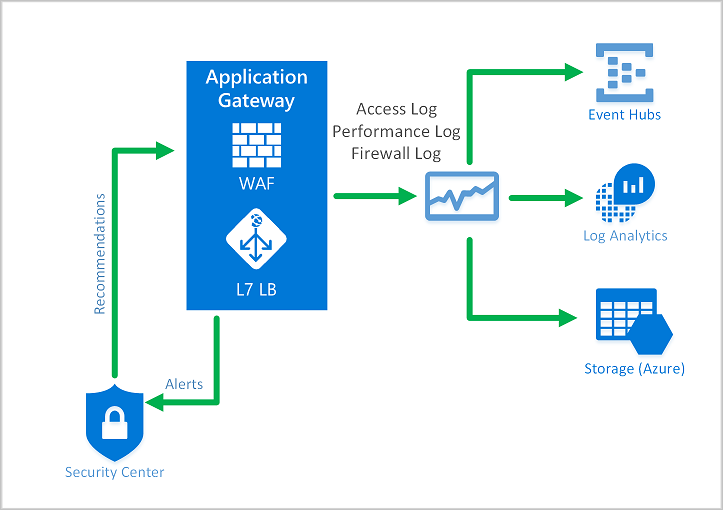
WAF logs are critical for both security operations and tuning. Enable diagnostic settings on the App Gateway:
- App Gateway → Diagnostic settings → + Add diagnostic setting
- Select:
- ApplicationGatewayFirewallLog — WAF rule matches, blocks, and details
- ApplicationGatewayAccessLog — All requests (useful for correlating WAF events with application behavior)
- Send to: Log Analytics workspace (recommended), storage account, or Event Hub
Key Log Analytics Queries
Top blocked rules (last 24 hours):
AzureDiagnostics
| where ResourceType == "APPLICATIONGATEWAYS"
| where Category == "ApplicationGatewayFirewallLog"
| where action_s == "Blocked"
| summarize count() by ruleId_s, Message
| order by count_ desc
| take 20
False positive candidates (Detection mode — rules that would block but didn't):
AzureDiagnostics
| where Category == "ApplicationGatewayFirewallLog"
| where action_s == "Detected"
| summarize count() by ruleId_s, requestUri_s, Message
| order by count_ desc
| take 50
Blocked requests by client IP:
AzureDiagnostics
| where Category == "ApplicationGatewayFirewallLog"
| where action_s == "Blocked"
| summarize count() by clientIp_s
| order by count_ desc
| take 20
Integration with Sentinel and Defender for Cloud
- Microsoft Sentinel: Connect the Log Analytics workspace to Sentinel for automated threat detection and response. Use the built-in Azure WAF workbook for dashboards.
- Defender for Cloud: Automatically detects unprotected web applications and recommends WAF deployment. Once WAF is deployed, Defender shows WAF alerts alongside other security findings.
Cost
WAF pricing is based on the WAF_v2 SKU of Application Gateway:
| Component | Cost Model |
|---|---|
| Fixed hourly rate | Per gateway-hour (WAF_v2 is more expensive than Standard_v2) |
| Capacity units | Per CU consumed (combines connections, throughput, and compute) |
| WAF Policy | Free — no additional charge for the policy resource |
| Managed rule sets | Included in the WAF_v2 price |
| Custom rules | Included in the WAF_v2 price |
There's no per-rule or per-request charge for WAF. The cost difference between Standard_v2 and WAF_v2 is in the fixed hourly rate. For exact pricing, check the Application Gateway pricing page.
For internet-facing production workloads, the cost of WAF is trivial compared to the cost of a breach. This is not a "should we enable it" conversation. It's a "why isn't it enabled already" conversation.
Summary
| Decision Point | Guidance |
|---|---|
| Which rule set? | DRS 2.2 — latest, most coverage, fewest false positives |
| Detection or Prevention? | Start Detection, switch to Prevention after tuning |
| Bot Manager? | Enable 1.1 on all internet-facing gateways |
| Custom rules needed? | Almost always — geo-blocking, rate limiting, IP allowlists |
| Exclusions? | Add per-rule exclusions for false positives, never disable entire rule groups |
| Logging? | Mandatory — send to Log Analytics at minimum |
| Replace on-prem WAF? | Yes for HTTP/HTTPS workloads. Keep Azure Firewall for non-HTTP. |
Sources: Azure WAF on Application Gateway overview, Create WAF policies for Application Gateway, Custom rules overview, DRS and CRS rule groups, WAF exclusion lists, Zero Trust recommendations for App Gateway WAF, Secure your Application Gateway