Azure VPN Gateway: Setup and Best Practices
In this article
Azure VPN Gateway: Setup and Best Practices
A VPN gateway is the most common way to get private, encrypted connectivity into Azure without paying for a dedicated circuit. It terminates IPsec tunnels from your on-premises firewall, secures remote workers connecting from laptops, and links virtual networks together. This post covers what it is, the choices you have to make up front, how to stand one up, and the practices that keep it reliable.
What Is Azure VPN Gateway?
A VPN gateway is a specific type of virtual network gateway (gateway type Vpn) that sends encrypted traffic between an Azure virtual network and another location over the public internet. Each virtual network can have only one VPN gateway, and every connection through that gateway shares its bandwidth.
Under the hood it's two or more managed gateway VM instances that Azure deploys into a dedicated subnet in your virtual network. You don't see or manage those VMs; you just pick a SKU and Azure handles the rest. Those instances terminate the IPsec/IKE tunnels and route traffic between your VNet and the remote side.
There are three connection topologies, and most real deployments combine them.
Site-to-Site (S2S)
A site-to-site connection is an IPsec/IKE tunnel between your VPN gateway and an on-premises VPN device that has a public IP. This is the classic hybrid pattern: your datacenter or branch office talks to Azure as if it were just another network segment.

You can run more than one site-to-site connection from the same gateway to connect multiple branches; this is called a multi-site configuration. Multi-site requires a route-based VPN type because each site needs its own tunnel sharing the gateway's bandwidth.
Point-to-Site (P2S)
A point-to-site connection secures an individual client machine, a laptop, a desktop, connecting to your VNet from anywhere. There's no on-premises VPN device and no public IP required on the client side; the user starts the connection from a VPN client. This is the right tool for remote workers and small numbers of ad-hoc connections.
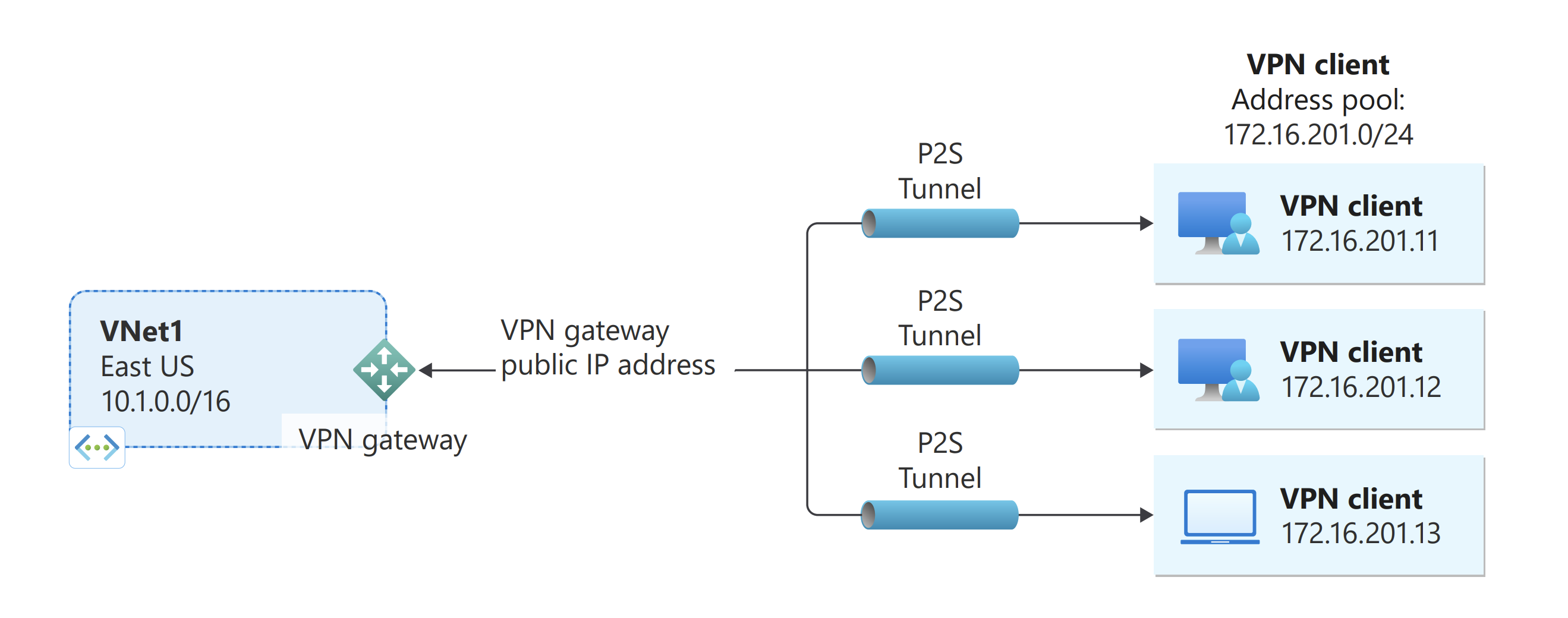
Point-to-site supports three tunnel protocols and three authentication methods:
| Options | |
|---|---|
| Tunnel protocols | OpenVPN (TLS), SSTP (TLS, Windows only), IKEv2 (IPsec) |
| Authentication | Certificate, Microsoft Entra ID, RADIUS |
OpenVPN and SSTP ride over TCP 443, so they sail through most firewalls. IKEv2 uses UDP 500/4500 and IP protocol 50, which restrictive firewalls sometimes block.
VNet-to-VNet
A VNet-to-VNet connection joins two virtual networks over an IPsec tunnel, even across regions or subscriptions. It works just like a site-to-site connection, except both ends are Azure VPN gateways. For most same-region VNet connectivity, virtual network peering is simpler and faster because it doesn't need a gateway at all, but VNet-to-VNet is useful when you want an encrypted tunnel or are bridging it into a wider cross-premises topology.

Coexistence with ExpressRoute
You can run a site-to-site VPN alongside ExpressRoute on the same VNet, typically as an encrypted failover path for the private circuit. This needs two separate virtual network gateways on the VNet, one of type Vpn and one of type ExpressRoute.
Route-Based vs. Policy-Based
Before you pick a SKU, decide on the VPN type. There are two, and the choice is mostly made for you.
| Route-Based | Policy-Based | |
|---|---|---|
| Platform | Modern (recommended) | Legacy |
| IKE version | IKEv2 (and IKEv1 on most SKUs) | IKEv1 only |
| Tunnels | Many | One S2S tunnel only |
| Point-to-site | Supported | Not supported |
| Active-active | Supported | Not supported |
| Portal support | Yes | No — PowerShell/CLI only (since Oct 2023) |
Use route-based. It's the default, it supports multiple connections, point-to-site, and active-active, and it's the only type available in the portal. Policy-based gateways exist only on the Basic SKU for older devices that can't do anything else, and you can't convert a policy-based gateway to route-based later, you'd have to delete and rebuild it.
Choosing a SKU
VPN Gateway SKUs differ in throughput, the number of tunnels they support, and which features they enable. The current generation is the AZ SKU family (VpnGw1AZ through VpnGw5AZ), which supports availability zones for zone-redundant deployments. Deploy an AZ SKU — the non-zonal VpnGw1–VpnGw5 SKUs can no longer be created for new gateways (as of November 1, 2025) and reached end-of-life on September 30, 2026. Microsoft is automatically migrating any remaining non-AZ gateways to their AZ equivalent (a seamless process with no expected downtime), but all new deployments should target the AZ family directly.
| SKU | Aggregate throughput benchmark | Max S2S/VNet tunnels | Max P2S connections (IKEv2/OpenVPN) | Zone-redundant |
|---|---|---|---|---|
| Basic | 100 Mbps | 10 | 128 (SSTP only) | No |
| VpnGw1AZ | 650 Mbps | 30 | 250 | Yes |
| VpnGw2AZ | 1.25 Gbps | 30 | 500 | Yes |
| VpnGw3AZ | 2.5 Gbps | 30 | 1,000 | Yes |
| VpnGw4AZ | 5 Gbps | 100 | 5,000 | Yes |
| VpnGw5AZ | 10 Gbps | 100 | 10,000 | Yes |
A few things to know:
- The Basic SKU is for dev/test only. It doesn't support active-active, BGP, or zone redundancy, only supports SSTP for point-to-site, and it can't be resized to a production SKU without a rebuild.
- AZ SKUs are the only SKUs to deploy now. Zone redundancy means the gateway survives a datacenter failure within a region. The non-zonal VpnGw1–5 SKUs can no longer be created for new gateways and reached retirement on September 30, 2026; Microsoft automatically migrates any remaining non-AZ gateways to the AZ equivalent, so new deployments use the AZ family exclusively.
- The old Standard and High Performance legacy SKUs were retired on June 30, 2026. If you're still on one, migrate now. The Basic public IP migration tool maps Standard to VpnGw1AZ and High Performance to VpnGw2AZ automatically as part of moving the gateway's Basic public IP to a Standard public IP.
- Throughput figures are an aggregate benchmark, not a guarantee. They're measured between VNets in the same region under ideal conditions, not a guaranteed cross-internet rate. Real throughput depends on your on-premises device, the encryption algorithm, and internet quality. GCMAES256 gives the best performance.
For exact pricing, see the VPN Gateway pricing page — you pay an hourly rate for the gateway plus egress data transfer.
Active-Active vs. Active-Standby
A VPN gateway is always two instances. The question is whether the second one carries traffic or just waits.
In active-standby mode (the default), only one instance handles connections. If it goes down for maintenance or fails, the standby takes over, but that failover causes a brief interruption for site-to-site and VNet-to-VNet, and disconnects all point-to-site clients, who then have to reconnect.
In active-active mode, both instances are live. Each gets its own public IP and establishes its own tunnel to your on-premises device, so you have two tunnels for the same connection at all times. You lose nothing during a single-instance failure, and you get higher aggregate throughput as a bonus.
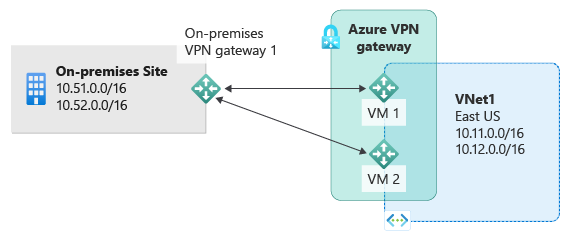
Enable active-active for any production gateway. The only caveat is that your on-premises VPN device must be configured to accept two tunnels (one per gateway public IP). If your device doesn't support it, check with the vendor before assuming you can't.
The Components You'll Create
Standing up a site-to-site VPN means creating several resources that fit together:
| Resource | Purpose |
|---|---|
| GatewaySubnet | A dedicated subnet named exactly GatewaySubnet where Azure places the gateway instances. |
| Virtual network gateway | The VPN gateway itself (type Vpn), with its SKU and active-active setting. |
| Public IP address(es) | One Standard, zone-redundant public IP per instance (two for active-active). |
| Local network gateway | Represents the on-premises side, holds its public IP and the on-premises address ranges (or BGP peer IP). |
| Connection | Ties the virtual network gateway to the local network gateway and carries the shared key. |
| On-premises VPN device | Your firewall or router, configured to match the Azure side. |
The GatewaySubnet has rules of its own:
- It must be named
GatewaySubnetexactly, Azure looks for that name. - Don't deploy anything else into it, and don't attach a network security group or custom route table that could break the control-plane traffic the gateway needs.
- Size it
/26(recommended), with/27as the practical minimum. A/26leaves room for active-active, BGP, and future ExpressRoute coexistence without renumbering.
Setting Up a Site-to-Site VPN
The walkthrough below follows the official Microsoft tutorial. By the end you'll have a route-based, active-active, zone-redundant gateway connected to an on-premises device.
-
Create or pick a virtual network, then add the gateway subnet. In the VNet, go to Subnets > + Gateway subnet, and give it a
/26range. There's only ever one gateway subnet per VNet, and it must be namedGatewaySubnet. -
Create the virtual network gateway. Search the portal for Virtual network gateways > + Create, then set:
- Gateway type: VPN
- SKU: a VpnGw_AZ SKU (e.g. VpnGw2AZ) for production
- Generation: Generation2
- Virtual network: the one with your GatewaySubnet
- Availability zone: Zone-redundant
- Enable active-active mode: Enabled (this prompts you to create a second public IP)
- Public IP address: create new, Standard SKU, zone-redundant
- Configure BGP: enable it if you run dynamic routing; the default ASN is 65515
Deploying the gateway takes a while, often 30–45 minutes. This is normal.
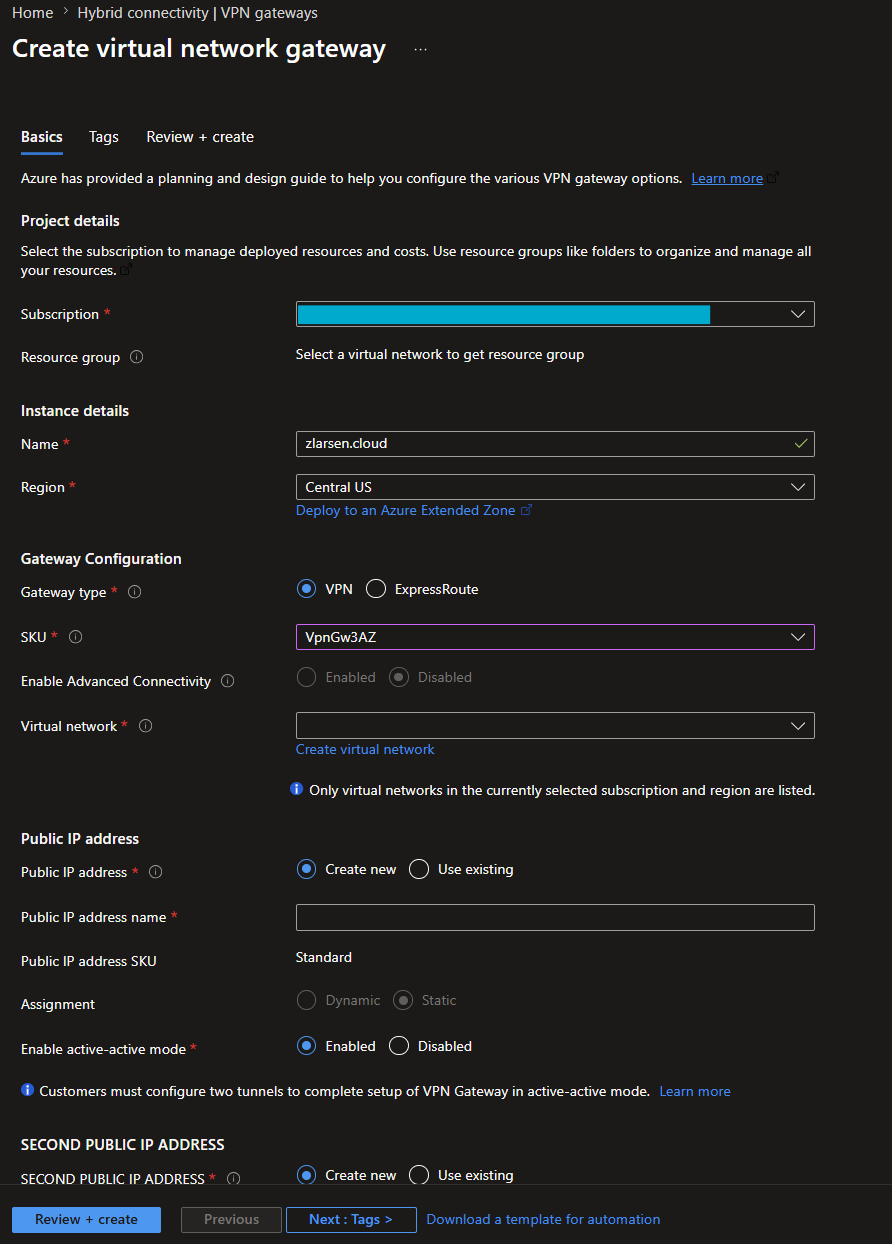
The Basics tab of Create virtual network gateway: project details, instance details, gateway configuration, and the first public IP. Active-active mode is enabled, which reveals the second public IP section. 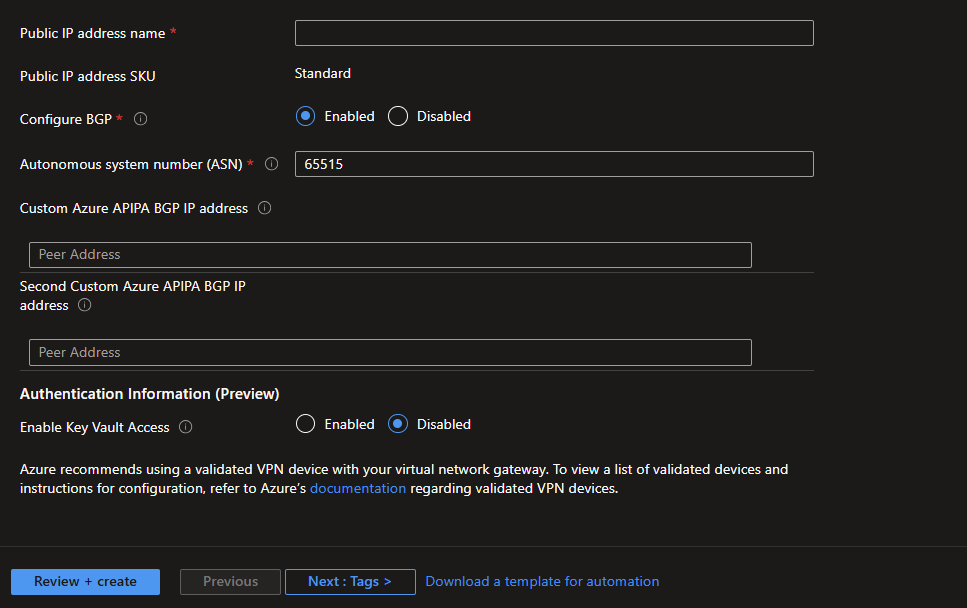
Scrolling down the same tab: the second public IP, BGP configuration with the default ASN 65515, optional custom APIPA addresses, and the preview Key Vault access option. -
Create the local network gateway. This object represents your on-premises VPN device. Provide its public IP address and the on-premises address space(s) you want to reach from Azure. If you're using BGP, enter the peer's ASN and BGP IP instead of static routes.
-
Create the connection. From the virtual network gateway, go to Connections > + Add, choose Site-to-site (IPsec), select the local network gateway, and set a shared key (PSK). This same key goes on your on-premises device.
-
Configure the on-premises device. Download the device configuration sample from the gateway if your vendor is supported, and set the matching IKE/IPsec parameters and shared key. For active-active, configure your device to build two tunnels, one to each gateway public IP.
-
Verify the tunnel. Back on the connection, the status should move to Connected. Test reachability across the tunnel, and check Insights / metrics on the gateway to confirm traffic is flowing.
For BGP, forced tunneling, certificate-based S2S, or point-to-site setup, the tutorial links out to the specific guides for each.
Best Practices
These are the choices that separate a tunnel that quietly works from one you're constantly babysitting.
- Use a route-based VPN type. It unlocks multiple connections, point-to-site, active-active, and IKEv2. Only fall back to policy-based for legacy devices that genuinely require it.
- Deploy an AZ SKU with zone redundancy. Production gateways should survive a zonal failure, and the AZ family is now the only one you can deploy for new gateways — the non-zonal VpnGw1–5 SKUs retire on September 30, 2026, and the legacy Standard/High Performance SKUs were retired on June 30, 2026.
- Enable active-active mode. It removes the failover gap, keeps point-to-site clients connected during maintenance, and raises throughput. Make sure your on-premises device can terminate two tunnels.
- Use Standard, zone-redundant public IPs. Basic public IPs are being retired; Standard zone-redundant IPs are the supported, resilient choice and a prerequisite for the AZ SKUs.
- Right-size the gateway subnet at
/26(recommended),/27minimum. It costs you nothing extra and saves a painful renumbering exercise when you later add BGP or ExpressRoute coexistence. - Use BGP for multi-connection and failover designs. Dynamic routing automatically learns and withdraws routes, which is far cleaner than maintaining static address lists across many sites, and it's required for some highly available topologies.
- Prefer GCMAES256 for IPsec. It delivers the best measured throughput and strong security; match a custom IPsec/IKE policy on both ends if you need to lock down the cipher suite.
- Monitor the gateway with Azure Monitor. Track tunnel ingress/egress, bandwidth, and tunnel connectivity, and alert on tunnel drops so you hear about a problem before your users do. Watch for SKU-level throughput ceilings as traffic grows.
- Plan non-overlapping address spaces. On-premises, Azure VNet, and point-to-site client pools all need distinct, non-overlapping ranges or routing will break.
When VPN Gateway Isn't the Right Tool
VPN Gateway is the right answer for encrypted hybrid connectivity over the internet at modest scale. It's not always the best fit:
- For consistent high bandwidth and low latency, use ExpressRoute for a private circuit, and keep a VPN as the encrypted failover path.
- For many spoke VNets and branches at scale, look at Azure Virtual WAN, which gives you a managed hub-and-spoke model with VPN, ExpressRoute, and point-to-site terminated in a Microsoft-managed hub.
- For same-region VNet-to-VNet traffic that doesn't need encryption in transit, virtual network peering is simpler and cheaper than a gateway.
Conclusion
A VPN gateway isn't complicated to deploy, but the up-front choices, route-based, an AZ SKU, active-active, Standard zone-redundant public IPs, a roomy gateway subnet, are what determine whether it's a reliable production circuit or a source of recurring tickets. Make those choices deliberately, monitor the tunnel, and it'll quietly do its job.
For the full reference, start with What is Azure VPN Gateway? and the topology and design guide.