SHIR, ADF, and Synapse: Networking a Hybrid Data Pipeline (and Where Fabric Fits)
In this article
SHIR, ADF, and Synapse: Networking a Hybrid Data Pipeline (and Where Fabric Fits)
Most cloud analytics projects start with the same awkward reality: the data you want to analyze lives somewhere private. A database in your own datacenter, a managed database in another cloud, a file share behind a firewall. None of it is reachable from the public internet, and your security team would like to keep it that way. The job is to move that data into Azure, land it in a lake, transform it, and let people build reports on top of it, all without punching holes in the network.
The piece that makes this possible is the self-hosted integration runtime, and the services around it are Azure Data Factory and Azure Synapse Analytics. If you are new to these, the names blur together fast. This post pulls them apart, walks through the networking that actually matters, gives you some real use cases, and finishes with how Microsoft Fabric changes the picture over the next few years.
The Cast of Characters
Four terms come up constantly, and it helps to define them before going further.
Integration Runtime (IR) is the compute that Data Factory and Synapse use to move and transform data. It comes in three flavors:
- Azure IR is fully managed compute that runs in Microsoft's network. You use it when both ends of the copy are reachable over public or private Azure endpoints. This is the "Azure Runtime" you will hear people mention.
- Self-Hosted IR (SHIR) is software you install on your own Windows machine. You use it when a source or sink is private, on-premises, or in another cloud. It reaches into the network the managed Azure IR cannot.
- Azure-SSIS IR runs lift-and-shift SQL Server Integration Services packages. It is a niche case and not the focus here.
Azure Data Factory (ADF) is a standalone, fully managed service whose whole job is data integration: connect to sources, copy data, transform it, and orchestrate the workflow on a schedule or trigger.
Azure Synapse Analytics is a broader analytics workspace that bundles the Data Factory engine together with a data warehouse, Spark, serverless SQL, and Power BI integration, all under one roof.
Keep those straight and the rest of this falls into place.
The Self-Hosted Integration Runtime, Up Close
The single most useful thing to understand about the SHIR is that it is a client, not a server. It only ever makes outbound connections. Nothing in Azure, and nothing in your other cloud, ever dials into it. Every connection starts from the SHIR and goes out. That is why you open outbound 443 and never open a single inbound port, which is exactly the property that makes security teams comfortable.
You install it on a Windows machine that sits inside your network, close enough to reach the private data sources but on a separate box from the databases themselves. For production you run two to four nodes so a single machine going down does not stop your pipelines. One rule worth remembering early: do not install the SHIR on the same machine as a Power BI data gateway, because both want port 443 and they will fight over it.
At the corporate firewall, the SHIR needs a short list of outbound destinations on 443. The essentials are Azure Relay (for interactive authoring like testing a connection or previewing data), the Data Factory or Synapse service endpoint, download.microsoft.com for updates, and the data-plane endpoints for wherever it writes, such as your storage account and Key Vault.
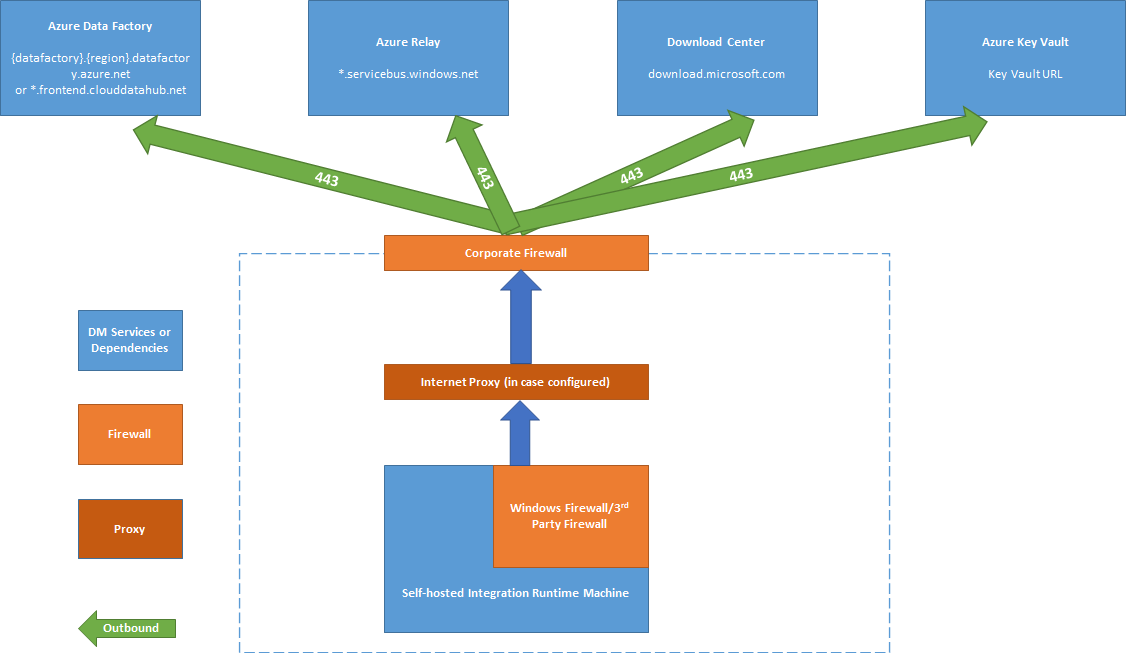
If your firewall wants exact URLs instead of the *.servicebus.windows.net wildcard for Azure Relay, you can pull the specific FQDNs from the SHIR node under View Service URLs, or turn on self-contained interactive authoring to skip the relay entirely. The full list lives in the Microsoft docs for creating a self-hosted integration runtime.
ADF vs. Synapse: The Same Engine in Two Packages
Here is the fact that saves the most confusion: Synapse pipelines are Azure Data Factory. Microsoft built Synapse's data-integration features on the ADF engine, so the visual designer, the Copy activity, the linked services, and the integration-runtime model are the same in both.
The difference is packaging. ADF is the mover on its own. Synapse is the mover plus the warehouse plus Spark plus serverless SQL, integrated into one workspace with one security boundary. If you already run Synapse for the warehouse and serving layer, its built-in pipelines can do the ingestion too, and standing up a separate ADF next to it usually just duplicates linked services for little gain.
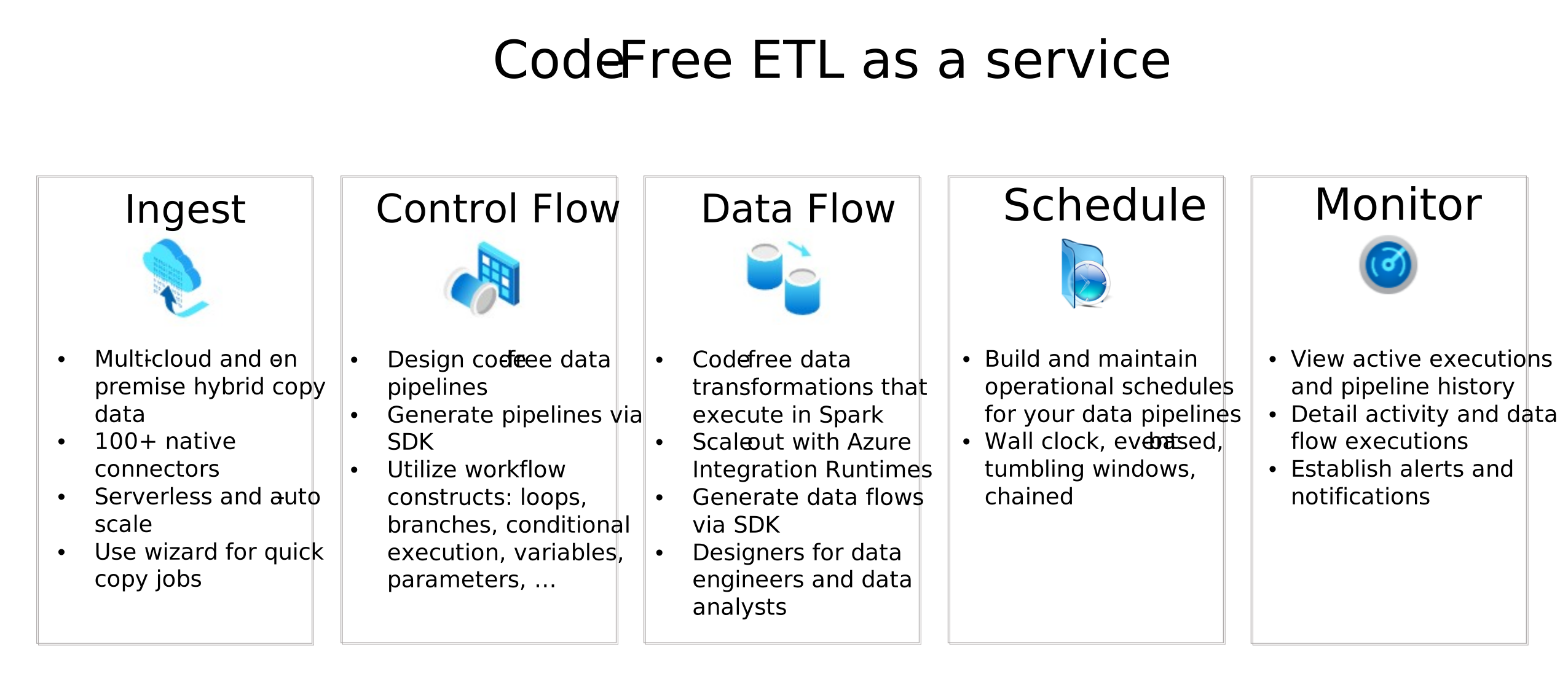
There are a few real feature differences worth knowing. Standalone ADF has some things Synapse pipelines do not: integration-runtime sharing across multiple factories, the Power Query activity, global parameters, and deploying pipelines with ARM templates. Synapse has native, in-workspace integration with its SQL pools and Spark, plus monitoring of Spark jobs for data flows. Microsoft keeps an official comparison if you need the full grid.
For a hybrid pipeline, the IR-sharing difference is the practical one. A SHIR registers to one factory or one Synapse workspace. ADF lets you share that SHIR across factories; Synapse does not support IR sharing. So a design that uses both ADF and Synapse often means two SHIR installs, which is one more reason to pick a single orchestrator and stick with it.
Networking Considerations
Moving the bytes is easy. The reason these projects stall is the network setup around private endpoints and DNS. Here is what actually matters, in the order it tends to bite you.
Private Endpoints Give Your PaaS a Private IP
A private endpoint puts a service like your storage account, Key Vault, or Synapse workspace onto a private IP inside your virtual network. Traffic to it stays on the Microsoft backbone and never touches the public internet. Good so far. The catch is name resolution. The public name, something like youraccount.dfs.core.windows.net, resolves to a public IP by default, and you want the private one instead. That is the job of the privatelink DNS zones.
Hybrid DNS Is the Piece That Breaks
Those private DNS zones only help clients that use Azure DNS. Your SHIR is on-premises, so it uses your on-premises DNS, which knows nothing about them. This is where most hybrid pipelines fail, and it fails quietly, because everything looks connected right up until a copy activity cannot find the storage account.
The fix is a hybrid DNS chain:
- Stand up an Azure DNS Private Resolver with an inbound endpoint in the Azure virtual network.
- On your on-premises DNS servers, add conditional forwarders for the relevant public parent zones (
dfs.core.windows.net,vault.azure.net,sql.azuresynapse.net, and so on) pointing at that inbound endpoint. - Link the
privatelinkzones to the virtual network so the resolver can answer.
Forward the name your clients actually ask for, which is not always the name of the privatelink zone. Storage lines up cleanly: you query youraccount.dfs.core.windows.net and the private zone is privatelink.dfs.core.windows.net, so a forwarder on dfs.core.windows.net works. Key Vault does not. You query yourvault.vault.azure.net, but its private zone is privatelink.vaultcore.azure.net. Forward only vaultcore.azure.net and the first lookup for vault.azure.net never reaches the resolver, it goes to Azure DNS and comes back with the public record. Microsoft's guidance is to forward both vault.azure.net and vaultcore.azure.net to the resolver, and the Key Vault Private Link troubleshooting guide says so directly. The Azure Private Endpoint DNS reference is the source of truth for every service: its "Public DNS zone forwarders" column tells you exactly which names to forward, and for some services, Key Vault included, that list is broader than the privatelink zone name. When storage resolves privately but Key Vault does not, a missing vault.azure.net forwarder is usually why.
The validation is a one-liner you should build into your go/no-go. From the SHIR machine, run nslookup youraccount.dfs.core.windows.net. If it returns a private IP, you are good. If it returns a public IP, the chain is broken and you fix that before touching anything else. If you want a deeper refresher on the moving parts here, I wrote up Azure DNS 101 separately.
Synapse Managed VNet Means Two Sets of Private Endpoints
If your Synapse workspace uses a managed virtual network, Synapse's own pipeline and Spark compute runs in a Microsoft-managed network, not in your virtual network. That leaves you with two different sets of private endpoints, and they are easy to conflate because they are created differently, live in different networks, and get approved through different screens.
| Customer private endpoint | Managed private endpoint | |
|---|---|---|
| Where it lives | Your own virtual network | Inside Synapse's managed virtual network, a network you never see or configure directly |
| Who creates it | You, through the portal or IaC, like any other private endpoint | You, but from inside Synapse Studio (Manage → Managed private endpoints), or through the Synapse-specific API |
| Who actually uses it | The SHIR, the Power BI gateway, anything else sitting in or connected to your network | Synapse's own compute: pipeline copy activities, data flows, Spark jobs |
| Prerequisite | None beyond having a VNet | Requires the workspace to have a managed virtual network enabled at all |
| DNS resolution | Through the privatelink zone linked to your virtual network (and your hybrid DNS chain, for on-prem clients) |
Through the same privatelink zone concept, but linked automatically inside Synapse's managed network, no action from you |
A customer calls in a panic: their Synapse pipeline fails reading from ADLS Gen2 with a network error, but a test VM in their own virtual network connects to the same storage account's private endpoint fine. The private endpoint is not broken. The test VM used the customer private endpoint, which only proves that network can reach storage. Synapse's pipeline compute never runs in that network. It runs inside Synapse's managed virtual network and can only reach storage through a private endpoint created inside Synapse itself. Open Synapse Studio, create a managed private endpoint to the storage account, and approve the connection on the storage account side. The customer private endpoint was never involved, no matter how many times you re-check it.
For every resource, ask two questions. Does something in my network need this? That is a customer private endpoint. Does Synapse's own compute need this? That is a managed private endpoint. They are independent, and getting only one right is the most common way these builds pass every test except the one that matters.
You need both sets whenever both answers are yes, which they usually are for your primary storage account. Build only the customer set and Synapse pipelines still cannot reach storage. Microsoft documents the behavior under Synapse managed private endpoints.
If You Do Not Use Managed VNet
Data exfiltration protection is not an independent toggle. It only exists as an option if the workspace has a managed virtual network, so there are three states to choose from, decided once, at workspace creation, permanently.
| State | Managed VNet | DEP | What it means |
|---|---|---|---|
| 1 | Off | Not available | Synapse's pipelines and Spark pools run in a Microsoft-managed, multi-tenant network shared with other Synapse customers. Managed private endpoints do not exist, because there is no managed network for one to live in. |
| 2 | On | Off | Synapse's compute runs in a dedicated managed network with per-user Spark isolation. Managed private endpoints are available and can be used, but nothing forces Synapse to use them. |
| 3 | On | On | Same dedicated managed network, but egress is enforced. Synapse can only reach approved tenants and targets wired with a managed private endpoint. Synapse Studio warns you if an artifact still references the public IR. |
Without a managed VNet, there is no managed private endpoint capability at all. Synapse's pipeline and Spark compute reaches storage, Key Vault, and everything else over each resource's public endpoint. You narrow that with firewall IP rules and the "allow trusted Microsoft services" exception rather than leaving it wide open, but it is a public network path for Synapse's own compute, not a private one. Two things do not change across the three states: the dedicated and serverless SQL pools are always multi-tenant and outside any VNet, so the sql and dev private endpoints you build in your own network work identically either way, and your customer private endpoints for the SHIR and Power BI gateway are unaffected, since they never depended on the managed VNet question.
State 2 gives you the operational benefits (per-user Spark isolation, no inbound NSG rules to manage for Synapse's own traffic) and the option of private-only connectivity, but not the enforcement. An artifact can still reference the public Azure IR and reach a public endpoint even after you have built managed private endpoints for everything else, and nothing in the UI flags it, because the warning for a public IR reference is a DEP feature. Some things private, one thing quietly still public, no warning, is a common way to fail a security review after everyone thought the network was locked down.
People skip managed VNet for three reasons, and only the first holds up. One, a disposable proof of concept that gets torn down after the demo. Two, unfamiliarity: whoever stands up the workspace has never hit this decision, does not know DEP exists, and takes the default without reading the networking tab. Three, a mistaken belief that firewall IP rules on the storage account are an adequate substitute for private connectivity, when they are a different control and do not stop traffic from leaving over the public path. The last two are gaps in understanding that show up later as an audit finding. If the data matters enough to be asking about private endpoints and hybrid DNS, turn on managed VNet at creation, and treat DEP on top of it as a decision to make deliberately rather than one to default into either way.
Data Exfiltration Protection Is a One-Way Door
When you create a Synapse workspace, you can turn on data exfiltration protection (DEP). With it on, Synapse can only send data to approved tenants and to targets you explicitly connect with a managed private endpoint. It is a strong control for regulated data, with two consequences to plan for: every source and sink needs a managed private endpoint, and public package installs from places like PyPI are blocked. The important part is that you cannot change the managed-VNet and DEP settings after the workspace is created, so decide before you build. The details are in the data exfiltration protection docs.
Egress Control With Azure Firewall
If you route outbound traffic through Azure Firewall, remember the rule split: destinations on ports 80 and 443 go in as application rules, and anything on other ports goes in as network rules. Turn on the firewall's DNS proxy so your FQDN rules resolve consistently. This is where the SHIR outbound FQDNs land if you ever move the runtime into Azure.
A Quick DNS Zone Reference
For the private endpoints in a typical setup, these are the commercial-cloud zones you will create and link:
| Service | Private DNS zone |
|---|---|
| ADLS Gen2 (dfs) | privatelink.dfs.core.windows.net |
| Blob (staged copy) | privatelink.blob.core.windows.net |
| Key Vault | privatelink.vaultcore.azure.net |
| Synapse SQL (dedicated and serverless) | privatelink.sql.azuresynapse.net |
| Synapse Dev (Studio artifacts) | privatelink.dev.azuresynapse.net |
If you run in a sovereign cloud like Azure Government, every suffix changes (for example privatelink.dfs.core.usgovcloudapi.net). The full mapping is in the private endpoint DNS reference.
Getting Data Out: Power BI
Landing data in a lake is only half the story. People want reports, and Power BI has to reach data that now sits behind private endpoints with no public path. There are two independent traffic directions here that get mixed up constantly.
The first is outbound, meaning Power BI reaching into your data. That is the job of a data gateway. A common misconception is that cloud sources never need a gateway, but they do when the source sits behind a private network, which is exactly the situation with a private Synapse endpoint. You have two gateway options:
- The on-premises data gateway is software you install on a VM you manage. You handle patching, sizing, and clustering, and you can install custom drivers on it.
- The VNet data gateway is a Microsoft-managed gateway that natively supports private endpoints, so there is no VM for you to run. It requires Fabric or Premium capacity and is billed as an added premium infrastructure charge.
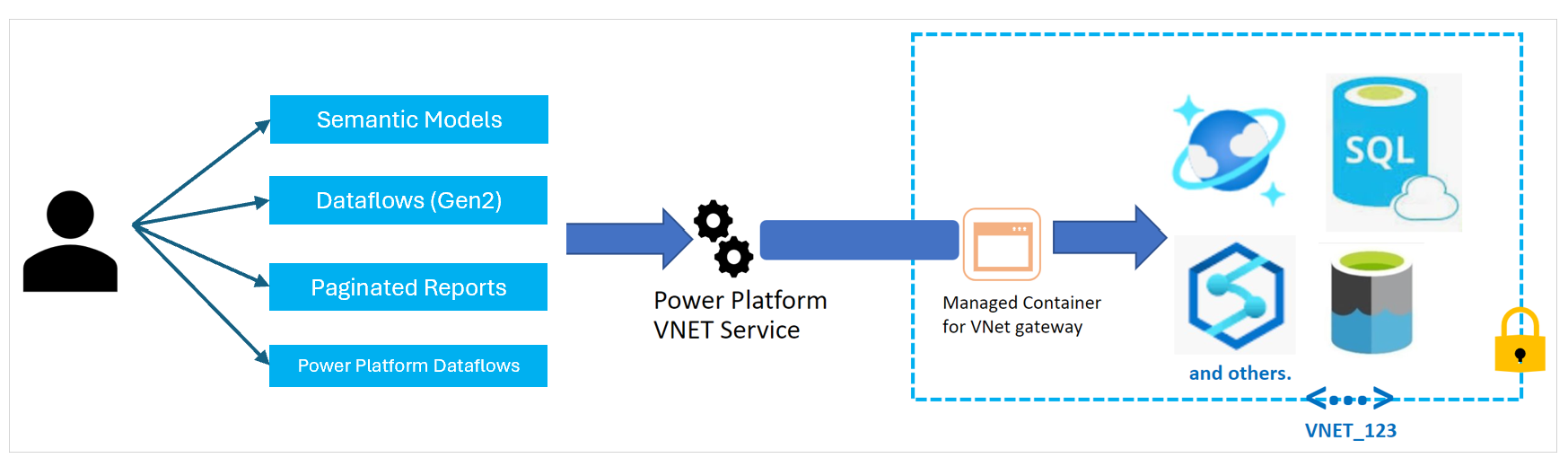
Either way, the same DNS rule applies. The gateway host has to route to the Synapse private endpoint and resolve its name to the private IP through the same hybrid DNS chain the SHIR uses. If the gateway resolves the public IP, refresh fails the same way a pipeline would.
The second direction is inbound, meaning locking down the Power BI service itself so users reach it over private IPs rather than the public endpoint. That is Power BI Private Link, and for on-premises clients you extend it over ExpressRoute or a site-to-site VPN. It generally requires Fabric or Premium capacity as well.

Real Use Cases
This pattern shows up a lot once you know what to look for. A few that map cleanly onto it:
- Hybrid ingestion into a lake. You have an operational database on-premises and another in a second cloud, and you want both landed in Azure Data Lake Storage for analytics. The SHIR reaches both over your private links, lands the data privately, and pipelines schedule the refresh. This is the bread-and-butter case.
- Regulated data platform with no public egress. Government, healthcare, and financial workloads that cannot expose data to the internet. Private endpoints everywhere, DEP on the Synapse workspace, and egress forced through a firewall give you an environment you can defend in an audit.
- Consolidating scattered ETL into one warehouse. Teams often have a mess of custom scripts and scheduled jobs moving data around. Replacing them with pipelines and a Synapse warehouse gives you central monitoring, retries, and lineage instead of a pile of cron jobs nobody wants to own.
- Gradual migration off legacy on-premises ETL. You do not have to move everything at once. The SHIR lets you start pulling select tables into the cloud while the old system keeps running, so you migrate workload by workload instead of in one risky cutover.
- Raw-to-serve analytics. Land raw data in the lake, transform it with pipelines or Spark, serve it through Synapse serverless SQL, and report on it in Power BI. One workspace covers ingest, transform, serve, and connect.
Where Fabric Fits Long Term
If you are planning a platform to live for years, you cannot ignore Microsoft Fabric. Microsoft has been clear that Data Factory in Fabric is the next generation of Azure Data Factory, with a simpler architecture, built-in AI, and a documented upgrade path from existing ADF and Synapse workloads.

The idea behind Fabric is one unified SaaS platform where the workloads you have been treating as separate services, Data Factory, warehousing, Spark, real-time analytics, and Power BI, all sit on a shared data lake called OneLake. Data is stored once in an open Delta format and reused across workloads without copying it around, with Copilot for authoring help and Purview-backed governance built in.
A couple of Fabric capabilities are worth knowing about specifically because they change how a hybrid pipeline like this might look in the future:
- Mirroring continuously replicates an operational database into OneLake in near real time, in Delta format, without you building ETL for it. For supported sources this can replace a chunk of the copy-pipeline work entirely.
- Copy job gives you a simpler alternative to full pipelines for many source-to-destination movements, including incremental and change-data-capture styles.
Here is the honest framing on timing. Fabric is where new investment is going, and starting there makes sense for greenfield work. But a hybrid pipeline built on a self-hosted integration runtime, private endpoints, and disciplined DNS is not wasted effort. The SHIR concept, the private-endpoint model, and the hybrid DNS chain all carry forward, and Fabric still reaches private and on-premises sources through a gateway. If you are standing something up today, build it well on ADF or Synapse, keep the networking clean, and treat Fabric as the direction you grow into rather than a reason to wait.
A Sane Order of Operations
If you are about to build this, the sequence that avoids the most pain looks like:
- Decide your orchestrator (Synapse or ADF) and confirm the managed-VNet and DEP settings before you create anything, since those cannot change later.
- Stand up the SHIR nodes and open the outbound firewall FQDNs.
- Prove raw network reachability to your private sources before involving any Azure service.
- Build the hybrid DNS chain and validate it with
nslookupfrom the SHIR. - Create the private endpoints, both the customer set and the Synapse managed set.
- Route egress through the firewall.
- Add the Power BI gateway and test a query end to end.
Notice that DNS comes before the private endpoints in that order. That is deliberate. DNS is the thing most likely to be quietly wrong, so you want it proven before you start troubleshooting anything downstream.
To Sum it up
The mental model that makes all of this manageable is small. The SHIR is a client that only reaches outward, so you never open inbound ports. ADF and Synapse pipelines are the same engine in different packaging, so pick one. Private endpoints keep traffic private, but they only work if DNS resolves to the private IP, which for an on-premises runtime means a hybrid DNS chain you have to build and test on purpose. Power BI reaches the data through a gateway, and locking down the service itself is a separate, optional step. And Fabric is where this all consolidates over time, without throwing away the fundamentals you learn building it the current way.
Get the networking right and the data movement is almost boring, which, for a data platform, is exactly what you want.