Azure Front Door: What It Is, How to Deploy It, and Every Config Option Explained
In this article
Azure Front Door: What It Is, How to Deploy It, and Every Config Option Explained
Every millisecond between your users and your app is a tax. A user in Sydney hitting an origin in East US pays that tax on every request: TLS handshakes, round trips, cold connections. Azure Front Door is Microsoft's answer: a global entry point that terminates connections close to the user, routes intelligently to the healthiest and fastest origin, caches what it can, and inspects everything through a web application firewall before it ever reaches your code.
This post covers what Front Door is, how to deploy one step by step (portal and Azure CLI), what every configuration option actually does, when Front Door is the right tool, and the new Edge Actions preview that lets you run custom JavaScript at Microsoft's edge. Every claim here is cross-referenced against the official Microsoft Learn documentation, with links throughout.
What Is Azure Front Door?
Azure Front Door is an advanced content delivery network (CDN) for the cloud that combines global load balancing, dynamic and static site acceleration, TLS offload, caching, and a web application firewall into a single service. It uses Microsoft's global edge network, global and local points of presence (PoPs) positioned close to users, to deliver content fast and reliably, per the Azure Front Door overview.
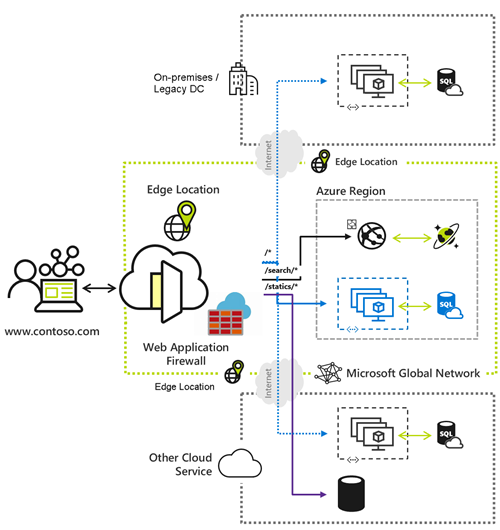
Front Door operates at OSI Layer 7 (the application layer), which means it makes decisions based on HTTP/HTTPS attributes (hostnames, paths, headers), not just IP and port. Because it terminates the client connection at the edge and opens a separate connection to your origin, it can offload TLS, cache responses, rewrite requests, and run WAF inspection before traffic reaches your servers.
Per the overview docs, the key benefits include:
- Global scale on Microsoft's network: more than 192 edge locations across 109 metro areas, connected to Azure over a private enterprise-grade WAN. Microsoft cites latency improvements of up to three times.
- Acceleration: anycast routing and split TCP shorten the round trips between user and edge.
- TLS offload at the edge with integrated, free, auto-rotating managed certificates.
- Native IPv6 and HTTP/2 support end to end.
- Intelligent routing across origins with health-probe monitoring and automatic global failover.
- An enhanced rules engine with regular expressions and server variables to move routing logic to the edge.
- A secure perimeter: built-in Layer 3/4 DDoS protection, a seamlessly attached WAF for Layer 7, bot management, and Private Link to reach origins privately.
If you've read my Application Gateway post, the mental model is: Application Gateway is regional Layer 7; Front Door is global Layer 7. They're complementary, not competitors.
Standard vs. Premium: Which Tier?
New Front Door deployments use one of two tiers: Standard or Premium. (Azure Front Door classic no longer supports new profile creation as of August 15, 2025 and retires on March 31, 2027, so don't build anything new on it.)
The practical difference comes down to security features. Here's the docs-sourced comparison from the tier comparison:
| Capability | Standard | Premium |
|---|---|---|
| Static + dynamic delivery, caching, compression | ✓ | ✓ |
| Custom domains, managed TLS, bring-your-own cert | ✓ | ✓ |
| Origin load balancing, path-based routing, rules engine | ✓ | ✓ |
| Server variables + regex in the rules engine | ✓ | ✓ |
| WebSockets, HTTP/2, IPv4/IPv6 dual stack | ✓ | ✓ |
| Custom WAF rules | ✓ | ✓ |
| Geo-filtering, Layer 3/4 DDoS protection | ✓ | ✓ |
| Microsoft-managed WAF rule set | — | ✓ |
| Bot protection | — | ✓ |
| Private Link connection to origin | — | ✓ |
Rule of thumb: choose Premium if you need Microsoft-managed WAF rule sets, bot protection, or Private Link to a private origin. Choose Standard for content delivery and acceleration where custom WAF rules are enough. You can upgrade Standard to Premium later without re-creating the profile; there is no seamless downgrade.
Both tiers support TLS 1.3 and TLS 1.2 and compress with gzip and Brotli.
Core Concepts: Profiles, Endpoints, Origins, and Routes
Before deploying, it helps to understand how the pieces nest. Front Door Standard/Premium is organized like this:
Profile (the Front Door resource + tier)
└── Endpoint (a hostname, e.g. contoso-xxxx.z01.azurefd.net)
    └── Route (matches incoming requests → sends them to an origin group)
        ├── Origin group (a pool of origins + health-probe + load-balancing settings)
        │   ├── Origin (a backend: App Service, Storage, VM, any public host)
        │   └── Origin (another backend for redundancy)
        └── Rule set (optional edge logic applied to the route)
- Profile: the top-level Front Door resource; it carries the tier (Standard or Premium).
- Endpoint: a logical grouping of routes with a Front Door–assigned hostname (
*.z01.azurefd.net). A profile can have many endpoints. - Origin: a backend Front Door pulls content from on a cache miss (App Service, Blob Storage, a VM, or any reachable public host).
- Origin group: a set of origins that share health-probe and load-balancing settings; this is where failover and traffic distribution are defined.
- Route: the mapping that takes matching requests on an endpoint and forwards them to an origin group.
- Rule set: optional match-and-action logic (rewrites, header changes, caching overrides, and now Edge Action invocations) attached to a route.
Deploy Azure Front Door, Step by Step
You can stand up Front Door in the portal, the Azure CLI, Bicep/ARM, or PowerShell. I'll show the portal flow and then a full, validated CLI walk-through.
Option A: The Azure Portal
The portal's Custom create flow walks you through the same objects described above:
- In the portal, search for Front Door and CDN profiles and select Create.
- Choose Custom create (the guided option that exposes routing and security settings).
- Basics: pick the subscription, resource group, profile name, and tier (Standard or Premium).
- Endpoint: add an endpoint; it gets a
*.z01.azurefd.nethostname. - Origins: add one or more origin types (App Service, Storage, Custom host), set the origin host header, and add them to an origin group.
- Routing: create a route that links the endpoint to the origin group, choose supported protocols (HTTP/HTTPS), and enable HTTPS redirect.
- Security (Premium for managed rules): attach a WAF policy, then Review + create.
After creation it takes a few minutes to propagate globally, then you browse the endpoint hostname to test.
Option B: The Azure CLI (az afd)
This sequence mirrors the official Create an Azure Front Door using Azure CLI quickstart, which deploys a profile in front of two Web Apps in different regions for active/active global failover.
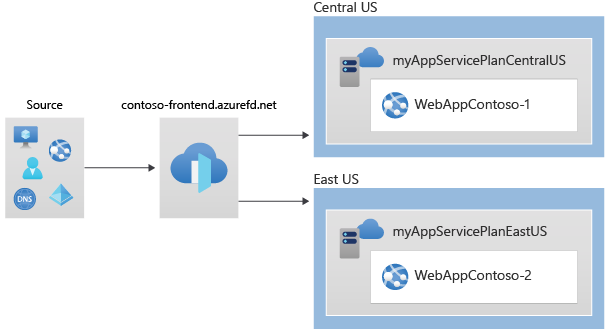
1. Resource group and profile. Use Premium_AzureFrontDoor or Standard_AzureFrontDoor for the SKU. Managed WAF rules require Premium.
az group create --name myRGFD --location centralus

az afd profile create \
    --profile-name contosoafd \
    --resource-group myRGFD \
    --sku Premium_AzureFrontDoor
2. Endpoint. A logical grouping of routes with a Front Door–assigned hostname.
az afd endpoint create \
    --resource-group myRGFD \
    --endpoint-name contosofrontend \
    --profile-name contosoafd \
    --enabled-state Enabled
3. Origin group. This is where health probes and load-balancing samples are defined.
az afd origin-group create \
    --resource-group myRGFD \
    --origin-group-name og \
    --profile-name contosoafd \
    --probe-request-type GET \
    --probe-protocol Http \
    --probe-interval-in-seconds 60 \
    --probe-path / \
    --sample-size 4 \
    --successful-samples-required 3 \
    --additional-latency-in-milliseconds 50
4. Origins. Add each backend. Note --origin-host-header, --priority, and --weight, all explained in the next section.
az afd origin create \
    --resource-group myRGFD \
    --host-name webappcontoso-01.azurewebsites.net \
    --profile-name contosoafd \
    --origin-group-name og \
    --origin-name contoso1 \
    --origin-host-header webappcontoso-01.azurewebsites.net \
    --priority 1 \
    --weight 1000 \
    --enabled-state Enabled \
    --http-port 80 \
    --https-port 443
Repeat for the second origin (contoso2, pointing at webappcontoso-02.azurewebsites.net).
5. Route. Map the endpoint to the origin group and turn on HTTP-to-HTTPS redirect.
az afd route create \
    --resource-group myRGFD \
    --profile-name contosoafd \
    --endpoint-name contosofrontend \
    --forwarding-protocol MatchRequest \
    --route-name route \
    --https-redirect Enabled \
    --origin-group og \
    --supported-protocols Http Https \
    --link-to-default-domain Enabled
6. (Premium) Attach a WAF policy with managed rules, then bind it to the endpoint with a security policy:
az network front-door waf-policy create \
    --name contosoWAF \
    --resource-group myRGFD \
    --sku Premium_AzureFrontDoor \
    --disabled false \
    --mode Prevention

az network front-door waf-policy managed-rules add \
    --policy-name contosoWAF \
    --resource-group myRGFD \
    --type Microsoft_DefaultRuleSet \
    --action Block \
    --version 2.2
Get the endpoint hostname with az afd endpoint show, then browse to contosofrontend-<hash>.z01.azurefd.net. Requests route to the least-latent healthy origin. Stop one Web App and refresh: Front Door fails over automatically. That's the point.
Option C: Bicep / ARM / PowerShell
For repeatable, reviewable infrastructure, define the same objects in Bicep or ARM templates (Microsoft.Cdn/profiles and children), or use PowerShell. Front Door integrates with Azure DevOps–friendly tooling across SDKs, the CLI, and templates.
Every Configuration Option, Explained
This is the part most guides skip. Here's what each knob actually does.
Origin settings
| Option | What it does |
|---|---|
| Host name | The address of the backend Front Door connects to (e.g. app.azurewebsites.net). |
| Origin host header | The Host header Front Door sends to the origin. Many PaaS backends (App Service, Storage) route on it, so it usually matches the host name. |
| Priority | Integer 1–5; lower means higher priority. Drives the priority routing method (primary/backup). Multiple origins can share a priority. |
| Weight | Integer 1–1,000 (default 50); drives weighted distribution across origins of equal latency. |
| HTTP / HTTPS ports | The ports Front Door uses to reach the origin (defaults 80 / 443). |
| Private Link (Premium) | Connect to a private origin over Azure Private Link so the backend never needs a public endpoint. |
| Enabled state | Toggle an origin in or out of rotation without deleting it, handy for maintenance. |
Origin group: health probes and load balancing
The origin group governs how Front Door decides an origin is healthy and how it spreads traffic. Per the health probes docs:
| Setting | What it does |
|---|---|
| Probe protocol / path | HTTP or HTTPS request to a path (e.g. /) on each origin. Probes carry a User-Agent: Edge Health Probe header. |
| Probe method | HEAD or GET. New profiles default to HEAD, which Microsoft recommends to lower origin load and cost. |
| Probe interval | How often each Front Door edge probes (default frequency is 30 seconds). A 200 OK means healthy; anything else counts as a failure. |
| Sample size | The last n probe responses Front Door evaluates per edge. |
| Successful samples required | How many of those n must be healthy for the origin to be considered up. |
| Additional latency | The latency sensitivity band. Origins within this many milliseconds of the fastest are all eligible for traffic. |
If every origin in a group fails its probes, Front Door treats them all as unhealthy and distributes traffic round-robin until one recovers.
Route settings
The route is where request matching and forwarding behavior live:
| Option | What it does |
|---|---|
| Supported protocols | Accept HTTP, HTTPS, or both from clients. |
| HTTPS redirect | Automatically 301/308 redirect HTTP to HTTPS; enable it for public sites. |
| Forwarding protocol | How Front Door talks to the origin: MatchRequest, HttpOnly, or HttpsOnly. |
| Patterns to match | The path patterns (e.g. /*, /api/*) this route handles. |
| Origin group | The pool this route forwards matched traffic to. |
| Caching | Enable/disable caching, and control query-string behavior (ignore, use, or ignore-specific), compression, and cache duration. |
| Rule sets | Attach one or more rule sets to run edge logic for this route. |
Traffic routing methods
Front Door supports four routing methods, documented in Traffic routing methods to origin. They combine in a single decision flow: available → priority → latency → weight.
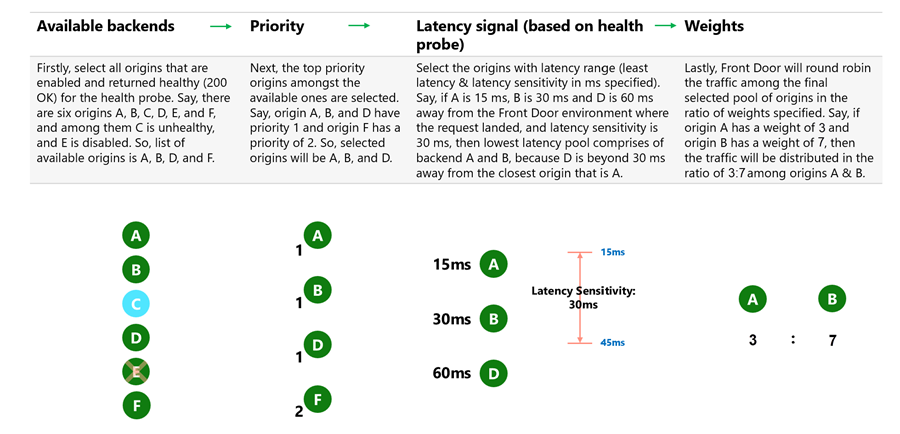
- Latency (default): routes to the origin with the lowest measured network latency within the sensitivity band. Each edge measures independently, so users everywhere get the closest-performing origin. Default latency sensitivity is 0 ms (always the fastest available).
- Priority: a primary/backup pattern. All traffic goes to the highest-priority (lowest-numbered) healthy origins; if they go down, traffic shifts to the next tier. Great for active/standby.
- Weighted: distributes traffic by weight ratios (1–1,000, default 50) among origins of equal latency. Ideal for gradual rollouts, cloud migration, and cloud-bursting.
- Session affinity: cookie-based stickiness (
ASLBSA/ASLBSACORScookies) that keeps a user's session on the same origin, useful for stateful apps and authentication flows.
Rule sets (the rules engine)
The rules engine lets you run match conditions → actions at the edge without touching your app. Conditions can inspect request path, headers, query strings, device type, geography, and server variables; actions can rewrite URLs, add/modify/remove headers, override caching or the origin group, redirect, and (in preview) invoke an Edge Action. Standard and Premium both support server variables and regular expressions here.
Web Application Firewall (WAF)
Front Door's WAF inspects traffic at the edge before it reaches your origin:
- Managed rule sets (Premium): Microsoft-maintained rules like the Default Rule Set (DRS) 2.2 — the latest version, baselined off OWASP CRS 3.3.4 — and the Bot Manager rule set, protecting against OWASP-class threats and malicious bots.
- Custom rules (Standard + Premium): your own IP allow/block lists, geo-filters, rate limits, and header/query matches. Custom rules evaluate before managed rules.
- Modes: Detection logs matches without blocking (use it to tune); Prevention actively blocks. Start in Detection, then switch to Prevention once you've confirmed no false positives. See policy settings. For a deeper WAF walkthrough, see my Application Gateway WAF post. Many of the same concepts apply.
Custom domains and TLS
Bring your own domain and secure it with either a free Front Door–managed certificate (auto-rotating) or a bring-your-own certificate stored in Azure Key Vault. Domain ownership is proven with a DNS TXT record (or prevalidated for Azure PaaS domains), per Configure HTTPS on a custom domain.
New: Front Door Edge Actions (Preview)
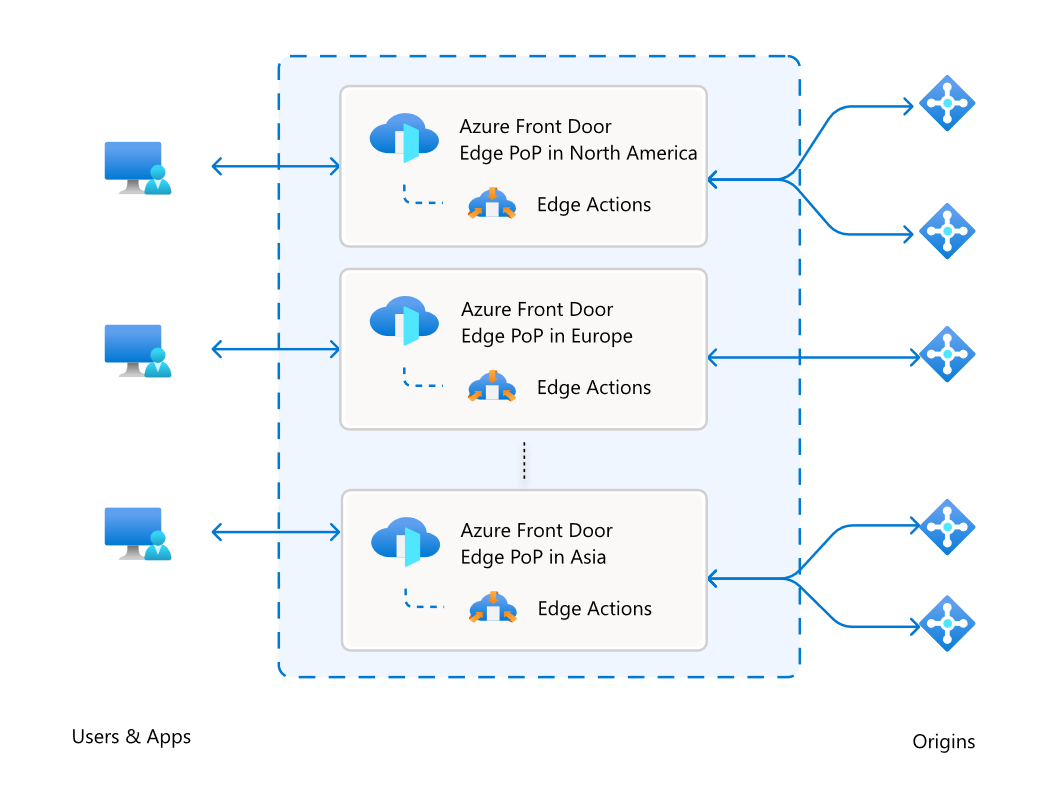
Edge Actions is a newer capability (currently in preview) that lets you run custom JavaScript logic directly at Front Door's global edge PoPs, against the request or response, with single-digit-millisecond execution. If the rules engine is "match a condition, take a predefined action," Edge Actions is "run my own code."
What it actually is
When you attach an Edge Action to a route (via the rules engine's Invoke Edge Action action), a matching request triggers your code inside a lightweight Hyperlight sandbox at the edge. The sandbox loads a secure JavaScript runtime, an immutable context object (server variables, the list of healthy origins for the route, the caller's country code, device type, and a timestamp), and your default code version. Your code can then modify the request, serve a cached response, or forward to the origin.
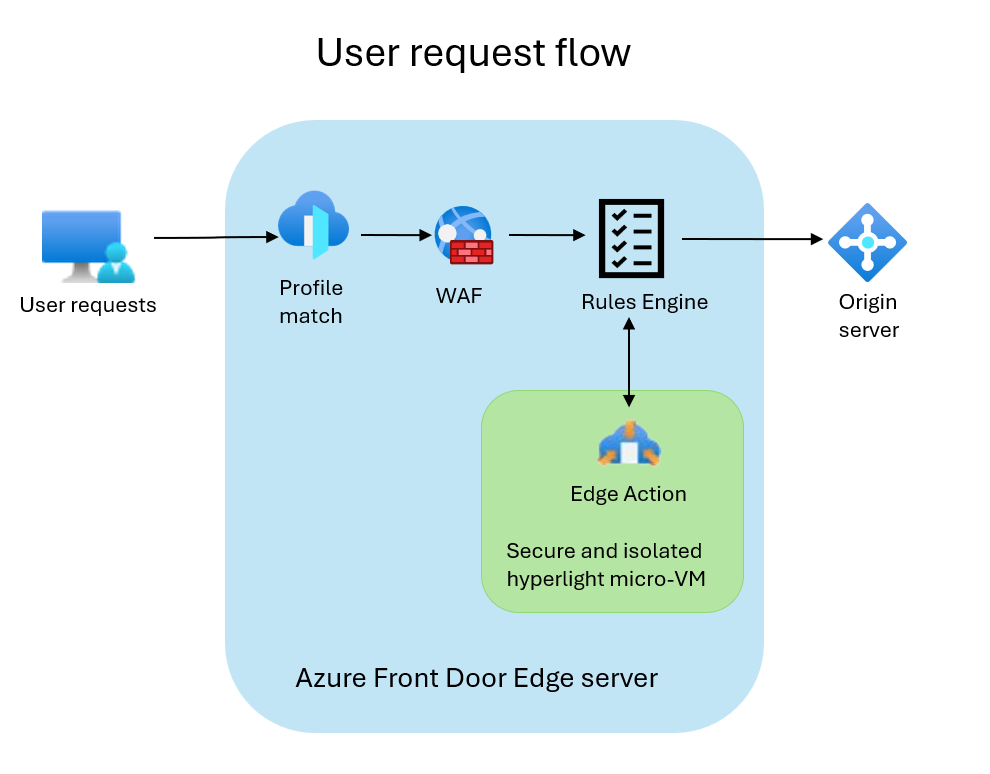
During preview, Edge Actions support client request invocations for these scenarios:
- A/B experimentation
- Request and response header manipulation
- Request rejection
- Dynamic origin selection
- URL rewrite
- URL redirect
- JWT token validation
Preview limits are worth knowing up front: JavaScript only, 16 KB code size, up to 3 versions per action, a 10 ms execution ceiling (the service terminates and forwards the request unmodified if you exceed it), and 100 Edge Action resources per subscription. Sample code lives in the Azure/EdgeActionsSamples repo, and you can author with the portal or a VS Code extension. During preview, use the Edge Actions preview portal link for all operations.
Why use it
- Latency: logic runs at the edge, microseconds from the user, instead of after a round trip to your origin.
- Origin offload: reject bad requests, validate tokens, and answer redirects at the edge so your backend never sees them.
- Expressiveness: real code (conditionals, string manipulation, JWT parsing) goes beyond what static rules-engine actions can express.
- Safe, fast iteration: versioning plus execution filters let you canary a new version to header-tagged requests and switch the default with zero downtime.
When it comes in handy
- A/B testing and canary releases: route a slice of traffic to a variant based on a header or cookie, and shift the default version without redeploying anything.
- Edge authentication: validate a JWT and reject unauthenticated requests before they touch your origin.
- Personalization and request shaping: rewrite URLs or set headers based on the caller's country, device type, or the current time.
- Dynamic origin selection: pick an origin at request time from the healthy set, based on your own logic.
- Security guards: reject malformed or unwanted requests at the edge as a complement to the WAF.
Rules engine vs. Edge Actions
Reach for the rules engine when a predefined match/action covers your need (simple header rewrites, redirects, caching overrides, geo rules). It's GA and requires no code. Reach for Edge Actions when you need real logic: parsing a token, computing a variant assignment, or making a decision that a static rule can't express. In practice they work together: the rules engine is what invokes your Edge Action.
When to Use Azure Front Door
Front Door is the right pick when all of these are true:
- Your traffic is HTTP/HTTPS (it's a Layer 7 service).
- Your app or content is internet-facing.
- You serve users across multiple regions or globally, and want edge caching, acceleration, and automatic failover.
- You want a global WAF and DDoS protection at the edge.
Here's how it fits against the other Azure load-balancing options (see Microsoft's load balancing decision guide):
| Scenario | Right tool | Why |
|---|---|---|
| Global, internet-facing web app/API needing CDN, edge WAF, failover | Azure Front Door | Global Layer 7, anycast, caching, edge WAF |
| Internet-facing web app in a single region needing WAF/URL routing | Application Gateway | Regional Layer 7, WAF, path-based routing |
| Global + deep per-region Layer 7 processing | Front Door + Application Gateway | Front Door for global routing; App Gateway per region |
| Non-HTTP (TCP/UDP) traffic | Load Balancer | Layer 4, any TCP/UDP protocol |
| DNS-based global routing, no TLS termination | Traffic Manager | DNS load balancing only, no proxying |
When not to use Front Door: if your traffic isn't HTTP(S), use Azure Load Balancer or Traffic Manager. If you only need regional Layer 7 with deep per-request inspection, Application Gateway is the simpler, cheaper fit.
Key Takeaways
- Azure Front Door is a global Layer 7 CDN + load balancer + WAF that terminates connections at Microsoft's edge and routes to the best origin.
- Premium adds managed WAF rules, bot protection, and Private Link; Standard covers delivery, acceleration, and custom WAF rules. Don't build new workloads on classic.
- Deployment is a predictable chain: profile → endpoint → origin group → origins → route (plus a WAF policy on Premium), and it's fully scriptable with
az afd. - Every knob has a job: priority/weight shape routing, health probes decide origin health, routes control matching and caching, rule sets run edge logic, and the WAF guards the perimeter.
- Edge Actions (preview) brings custom JavaScript to the edge for A/B testing, edge auth, personalization, and request shaping. Use it when the rules engine can't express your logic.